# Introduction

Welcome to the **Whiffle Wind Docs**! This portal is a central hub for detailed documentation and essential information about our web application.

At [Whiffle](https://whiffle.nl/), we’ve created the [Whiffle Wind web application](https://whiffle.cloud) with the goal of ensuring you have the best tool to help you in your job as a wind resource expert. As a user of Whiffle Wind, you’ll be able to conduct Large Eddy Simulations for entire wind farm sites with just a few clicks. We've focused on creating an extremely user-friendly interface, so that you can concentrate on the crucial aspects of your work. The outputs from the application provide you with detailed insights into your wind resources and improve the overall precision of your yield assessments.&#x20;

**Here's a quick overview of what you can do within the web application:**&#x20;

* Wind resource modelling
* Energy yield modelling

The Whiffle Wind Docs encompasses the following sections:&#x20;

* **Getting started** – Browse this overview detailing how you can add a turbine within the application and easily run a simulation.
* **FAQs** – Explore this section for concise answers to your common queries about navigating and utilizing the Whiffle Wind application effectively.&#x20;
* **Under the hood -** Discover what happens when a job is submitted through the Whiffle Wind application.
* **Output** – Get a clear explanation and interpretation of the data generated by Whiffle Wind simulations, including formats and visualization techniques.&#x20;
* **Use cases** - Explore practical scenarios demonstrating the applications of Whiffle Wind in real-world settings.
* **Troubleshooting** – Get assistance on common issues and challenges encountered while using Whiffle wind, with step-by-step solutions. &#x20;
* **Advanced topics** – Are you a seasoned Whiffle Wind user? Explore this section to deep dive into some of the more advanced features such as long-term correction and learn more about the Whiffle LES model.
* **Release notes** – Keep an eye on Whiffle Wind’s latest updates, including new features and bug fixes.&#x20;
* **Support** – We’re always ready to help: Find out how you can contact us for technical support and assistance.&#x20;
* **Terms & Conditions** – Read the legal and usage guidelines that govern the access and use of the Whiffle Wind web application and its resources.&#x20;

### Featured pages <a href="#whifflewinddocs-featuredpages" id="whifflewinddocs-featuredpages"></a>

* [Adding a custom turbine](/getting-started/adding-custom-data/adding-a-custom-turbine)
* [Setting up a simulation](/getting-started/running-a-simulation)
* [FAQ](/faq)

### Output <a href="#whifflewinddocs-output" id="whifflewinddocs-output"></a>

* [Atlas](/outputs/atlas)
* [Time series](/outputs/timeseries)
* [Statistics](/outputs/statistics)

### Use Cases <a href="#whifflewinddocs-usecases" id="whifflewinddocs-usecases"></a>

* [How to calculate total aerodynamic losses?](/use-cases/how-to-calculate-aerodynamic-losses)


# FAQ

**Are wakes and global blockage effects included?**

Yes. LES physically models the phenomena of wind, pressure and atmospheric stability and their interaction with wind turbine-induced wake and blockage effects. Therefore, we don't have to rely on non-physical/empirical correction factors for example blockage effects and deep-array effects.&#x20;

**Are external wind farm effects included?**

By default, external wind farms are not included in the simulation. However, external wind farms can be added to the simulation; then their effects on the target wind farm will be modelled and included. If you wish to have additional analysis of external effects, you may want to consider making use of Whiffle’s Consulting service. For more information, feel free to send an email to <info@whiffle.nl>.

**What is LES?**

Large Eddy Simulation (LES) is a Computational Fluid Dynamics (CFD) model for resolving turbulence and is gaining increased attention in the wind energy sector. The benefits of LES to model the wake and global blockage effects of wind farms lie in the fact it can model the interaction between wind farms and the atmospheric boundary layer (ABL). A recent overview on various aspects of the atmospheric flow through wind farms is presented in Stevens and Meneveau’s 2017 paper: [Flow Structure and Turbulence in Wind Farms](https://www.annualreviews.org/doi/10.1146/annurev-fluid-010816-060206), volume 49.

**How does the long-term correction work?**

Long term correction aims to correct the estimated AEP from a Whiffle Wind simulation to be representative of the AEP of a longer period, usually 10 or 15 years. This correction is performed by learning the statistical relationship between the wind farm power predicted by the LES and ERA5 wind speed on the LES period. This relationship is then applied to a long term period of 10-15 years of ERA5 wind speed data. This gives an estimate of the mean power that would be predicted by a 10-15 year LES run.

For more information on the long term correction method, please refer to the Long term correction advanced topic page. A paper about the implementation and validation of the long term correction implemented in Whiffle Wind will soon be available [here](https://whiffle.nl/insights/)!

**Can I perform calibraion based on local measurements?**

Calibration in Whiffle Wind is currently in **beta** and available to a select group of users. If you would like to try this feature, please contact [**support@whiffle.nl**](mailto:support@whiffle.nl) to request access.

The beta functionality is limited to **long-term corrected measurements** and **long-term statistics** outputs from Whiffle Wind.

**Can I make an intra-day or day-ahead power forecast?**

Yes, but not through Whiffle Wind. We have a separate forecast service that can provide wind and solar power forecasts, wind speed forecasts, and any number of other meteorological forecasts you may be interested in. See our forecasting service for more information [here](https://whiffle.nl/solutions/power-forecast/).

**What is the uncertainty of Whiffle Wind’s AEP prediction?**

Using SCADA data of wind farms, it is possible to make ex-post assessments of Annual Energy Production (AEP) predictions. Based on a small (N ≤ 10) sample of wind farms that Whiffle has modelled, we estimate the mean error of AEP predictions are around 2% (Whiffle’s model tends to underpredict AEP) with a standard deviation of 4%. These numbers are based on raw output from Whiffle Wind without any long-term correction or correction of mean wind speed biases. Therefore, this number represents not only errors in aerodynamic losses, but also errors in the mean wind speed.

**What is the resolution and why?**

The default resolution of our LES is 100 m x 100 m in the horizontal plane, 25 m vertically close to the ground. Our LES has been extensively validated on a wide range of sites (onshore, offshore, complex terrain) and wind farms for this resolution and provides the best trade-off between cost and accuracy.&#x20;

If you require other resolutions, please consider Whiffle’s Consultancy service which can be contacted via <info@whiffle.nl>.

**What is the mesoscale domain size and resolution?**

To bridge the gap between ERA5's 30 km resolution and our 100 m resolution LES, an in-house, GPU-resident meso-scale model is run concurrently to generate the boundary conditions for our LES on the fly.  This model is run on a typical meso-scale resolution of 2 km and on a domain of a few hundred kilometers depending on the size of the LES domain.&#x20;

**Is the simulation domain shown on the map the LES domain or the mesoscale domain?**

The rectangle drawn on the map within Whiffle Wind represents the LES domain. The LES domain is then nested within the larger mesoscale domain.

**Can I easily import an entire wind farm to set-up a simulation?**

Yes! For instructions see our Getting Started, Running a Simulation guide [here](/getting-started/running-a-simulation).

{% content-ref url="/pages/Naitr2Std5awZ9dGg4D5" %}
[Setting up a simulation](/getting-started/running-a-simulation)
{% endcontent-ref %}

**Can I easily import a new turbine type to set-up a simulation?**

Yes! For instructions see our Getting Started, Adding a Custom Turbine guide [here](/getting-started/adding-custom-data/adding-a-custom-turbine).

{% content-ref url="/pages/ti2mb2DIFnD7w2fko6EV" %}
[Turbines](/getting-started/adding-custom-data/adding-a-custom-turbine)
{% endcontent-ref %}

**How much does it cost?**

The cost is based upon the domain size and duration of the simulation. To get a general idea of costs:

A 12.8 km x 12.8 km one day simulation will cost around 6 Euro. A 12.8 km x 12.8 km full year simulation will cost around 2000 Euro.

A 51.2 km x 51.2 km one day simulation will cost around 21 Euro. A 51.2 km x 51.2 km full year simulation will cost around 7700 Euro.

Exact costs are shown prior to submitting a run; therefore, you will always know the cost up front.

**What is the largest domain that can be simulated?**

Currently a 90 km x 90 km domain is the largest. However, we’re working hard to make this even larger! If you need a larger domain, certainly feel free to contact Whiffle’s Consulting service via <info@whiffle.nl>.

**How long will it take for the simulation to run?**

This depends on the domain size and length of the simulation, as well as how many other simulations have been requested and are in the queue. As a rough guideline, generally a one-day simulation should be available the next day or sooner, and generally a full year simulation should be available the next week or sooner.

&#x20;**How does Whiffle manage the privacy of your data?**

Whiffle acknowledges the nature and sensitivity of customer data and is dedicated to safeguarding its privacy through the adoption of contemporary security practices in the Whiffle Wind solution. As part of this commitment, we are currently undergoing the certification process for ISO 27001 and incorporating the NIST Cybersecurity Framework.

If you need more information on how your data will be processed in Whiffle Wind, please contact us at <info@whiffle.nl>.


# Under the hood

When a job is submitted to Whiffle Wind, it enters a queuing system. The length of the queue varies based on the volume of ongoing tasks, but we aim for a maximum waiting time of one day. To maintain system efficiency and fairness, a maximum of two jobs per user can be processed concurrently.

### 1. Gathering user input

The first step in the processing chain is ingestion of user input, where the system gathers all necessary details from the user, including: the simulation period, locations and types of turbines, locations and heights of met masts, heights for [Wind Resource Grid (WRG)](broken://pages/0M2wC0809oEp1087T0XN) and [Fields (horizontal slices)](broken://pages/Pner36fzSQJ8J34zIiOc).

### 2. Calculating the LES domain

#### 2.1 Horizontal LES domain

The horizontal domain size of the [large-eddy simulation (LES)](/advanced-topics/the-whiffle-les-model) domain is defined as a bounding box around the turbine and met mast coordinates, keeping a spatial margin according to Whiffle’s best practices.

Wind farms can be toggled on or off for inclusion in the LES domain, allowing for flexibility in the calculation. When a wind farm is included in the LES calculation, its turbines are parametrised as actuator disks in both the LES and MESO simulation. If a wind farm is excluded, its turbines are only present in the MESO domain.

Some turbines in wind farms excluded from the LES may still fall within the bounding box (i.e. LES domain) applied around LES-included neighbouring wind farms, and will therefore be included as well. This proximity-based inclusion improves the accuracy of the output without incurring additional costs.

By default, the horizontal resolution of the LES domain is 100 metres.\
\
The LES has open in-and outflow boundary conditions and is nested with a one-way coupling in Whiffle’s in-house mesoscale model. The mesoscale domain has a fixed horizontal domain size of 256 kilometres by 256 kilometres and a resolution of 2 kilometres.

#### 2.2 Vertical LES domain

By default, the vertical resolution is 25 metres at ground level, with a 2% growth rate starting at 300 metres above the highest elevation level in the domain.&#x20;

The amount of vertical LES cells *Nz* is determined by the maximum elevation difference *h\_max* in the domain. By default, *Nz* = 71 for *h\_max =* 0 and increases roughly by 1 every 30 metres, until the elevation difference reaches around 1000 metres. Beyond that *Nz* sees a steeper increase of around 2 every 30 metres.

### 3. External data sources

The external data sources required as input by Whiffle’s LES model are retrieved for the user location, including: ERA5 Large-scale Numerical Weather Prediction data, ESA WorldCover, Ensemble DEM and the Global Canopy Map.

Roughness lengths for the domain are calculated by Whiffle in pre-processing, following Monin-Obukhov similarity theory.

### 4. Job queue

Now that all input data is in place and domain settings are well-defined, the simulation period is split into N jobs (1 job per day), with N the total number of days. The batch of jobs is distributed over a cluster of GPUs and for each individual job [The Whiffle LES Model](/advanced-topics/the-whiffle-les-model) is run with a simulation spin-up time of 6 hours for the mesoscale model, and 1 hour for the LES model.

* Depending on the user input, either or all of the following modules within the LES model are activated: the parametrisation of wind turbines, sampling of meteo-conditions at all met mast locations and heights, histogram creation of wind speed and wind direction for WRG output.
* Depending on the user-specified heights, a linear spatial interpolation between LES model levels is carried out. Below the lowest model level, a wall-model consistent extrapolation towards the ground is implemented.
* Depending on the user-specified locations, a nearest-neighbour selection of LES grid points is performed.
* 10 minute averages are recorded during the simulation.

### 5. Long term correction

Whiffle’s [Long term correction](/advanced-topics/long-term-representativeness) routine is carried out to provide the Annual Energy Production.

### 6. Output

The WRG file is compiled from the histograms, the met mast CSVs are compiled from output of the the terrain-following sample points and the turbines CSV is compiled from the actuator disk output.


# Support

Need help to get started? Check out our quick start guides.

* [Adding a custom turbine](/getting-started/adding-custom-data/adding-a-custom-turbine)
* [Running a simulation](/getting-started/running-a-simulation)

Still stumped? Certainly feel free to email <support@whiffle.nl> and one of our representatives will be in touch shortly.


# Expert Services

### What is Whiffle Expert Services?

Whiffle Wind gives you self-service access to fast, physics-based wind simulations. Whiffle Expert Services puts our own Large Eddy Simulation specialists and wind resource analysts to work to unlock the full power of the Whiffle LES model for your specific project. Where Whiffle Wind gets you standard results fast, Expert Services gets you tailored answers to your hardest wind energy related questions.

### How do you request Expert Services?

There are two options to request Expert Services:

* Reach out to our expert team directly: **<support@whiffle.nl>**
* Set up your standard simulation in Whiffle Wind and submit it '**via support**' with your special request.

After receiving your request we'll scope the right mix of expertise for your project and get you a tailor made proposal.

### What can you ask us to do?

* **Custom simulation setups** such as very large domains, custom terrain inputs, custom (statistically representative) simulation periods. For the full range of options, check [setting up a simulation](/getting-started/running-a-simulation).
* **Custom simulation outputs** such as additional variables, calibration of outputs and advanced visualizations. For all possibilities, check [Custom outputs](/outputs/custom-outputs).
* **Measurement Campaign Augmentation**: Optimize your measurement campaign, extend your measurement in time and space, LiDAR corrections and more. See [Measurement Campaign Augmentation](/use-cases/measurement-campaign-augmentation) for all details.
* **Wind Resource Assessment**: In depth analysis of complex flow cases, including turbulence Intensity, atmospheric stability, boundary layer effects and uncertainty assessments. Read more on [Wind Resource Assessment](/use-cases/wind-resource-assessment).
* **Turbine Interaction Effects**: Wind farm performance and turbine level turbine interaction effects, including internal wake losses, external wake losses and blockage effect. Check [Turbine Interaction Effects](/use-cases/turbine-interaction-effects) how Whiffle LES can add value to your project and lower your uncertainties.
* **Post construction analysis:** Evaluate power performance and assess the loads of your operating wind farms with Whiffle LES. More information: [Post Construction Assessment](/use-cases/post-construction-assessment)

Don't see exactly what you need? Our team regularly builds new capabilities around emerging use cases — ask us.

### &#x20;<br>


# Setting up a simulation

Welcome to our comprehensive guide on setting up a simulation! Whether you’re setting up your very first simulation or need a handy reference for running additional simulations, this guide has got you covered.

To get started, navigate to the homepage where you’ll find the **"+ New Simulation"** button. Click it to launch our intuitive simulation setup wizard.

Depending on the type of results you’re aiming for, we offer two distinct simulation options. Each option comes with its own step-by-step guide to follow, as well as unique outputs tailored to their respective purposes:

**Time Series:**\
This option enables you to simulate your entire period of interest to produce high-resolution time series data. It’s perfect for cases requiring detailed, granular insights across the full dataset.

Continue setting up your simulation with the [step-by-step Time Series guide](/getting-started/running-a-simulation/time-series). To preview what results look like, see [Time Series outputs](/outputs/timeseries).

**Statistics:**\
This mode allows you to simulate a sample of days to generate 20-year statistical data efficiently and cost-effectively. It’s ideal for gaining insights into long-term trends without needing to process the full dataset.

Continue setting up your simulation with the [step-by-step Statistics guide](/getting-started/running-a-simulation/statistics). To preview what results look like, see [Statistics outputs](/outputs/statistics).

#### &#x20;<a href="#runningasimulation-4.1windresourcegrid-wrg" id="runningasimulation-4.1windresourcegrid-wrg"></a>


# Time Series

### Step 1: Name <a href="#step-name" id="step-name"></a>

<figure><img src="https://927730225-files.gitbook.io/~/files/v0/b/gitbook-x-prod.appspot.com/o/spaces%2FrIjVtfK7J5LmiatpVpuO%2Fuploads%2FD9Fc6HtNWeFk8i4HtCMS%2Fnew-simulation-name.png?alt=media&amp;token=38359ae2-7042-463f-853e-3cdd739238dc" alt=""><figcaption></figcaption></figure>

Please provide a name for your simulation that is easily identifiable for future reference. Choose a clear and descriptive identifier to facilitate easy retrieval of the simulation later on.

### Step 2: Site <a href="#step-site" id="step-site"></a>

#### Virtual met masts

<figure><img src="https://927730225-files.gitbook.io/~/files/v0/b/gitbook-x-prod.appspot.com/o/spaces%2FrIjVtfK7J5LmiatpVpuO%2Fuploads%2F0LrsKaxvxItZRnjRsQQl%2Fsite%20step%20-%20virtual%20met%20mast.png?alt=media&amp;token=d8f0e4e3-5090-4830-8989-000acf219ce2" alt=""><figcaption></figcaption></figure>

Add virtual met masts to collect weather data at specific locations. You can do this by manually filling out the form or by uploading a CSV file.

The file should contain the following columns with these exact header names:

| **latitude** | **longitude** | **name** |
| ------------ | ------------- | -------- |
| 53.3         | 3.2           | t1       |

* **Latitude:** in decimal degrees: between -90 and 90
* **Longitude:** in decimal degrees: between -180 and 180
* **Name**: unique identifier for each turbine / metmast

Upon entering a location and name, the virtual met mast will be shown on the map. Whiffle automatically computes both [LES (Large Eddy Simulation) ](/advanced-topics/the-whiffle-les-model)and [MESO (Mesoscale) ](/advanced-topics/meso-simulation)domains.&#x20;

#### Wind farms

<figure><img src="https://927730225-files.gitbook.io/~/files/v0/b/gitbook-x-prod.appspot.com/o/spaces%2FrIjVtfK7J5LmiatpVpuO%2Fuploads%2Fok5lEG9V9SFNbnMsMzsa%2Fsite%20step%20-%20wind%20farms.png?alt=media&amp;token=8b1a36ce-80a3-49ca-896e-9c9fe6047cfb" alt=""><figcaption></figcaption></figure>

Add turbines, grouped into wind farms, to estimate power output. This can be done by manually filling out the form or by uploading a CSV file.

The file should contain the following columns with these exact header names:

| **latitude** | **longitude** | **name** |
| ------------ | ------------- | -------- |
| 53.3         | 3.2           | t1       |

* **Latitude:** in decimal degrees: between -90 and 90
* **Longitude:** in decimal degrees: between -180 and 180
* **Name**: unique identifier for each turbine / metmast

After uploading a CSV the desired turbine should be selected. Only one turbine model can be set per wind farm.

{% hint style="info" %}
Whiffle offers a basic NREL 5MW turbine as a default option, and you can also [add custom turbines](/getting-started/adding-custom-data/adding-a-custom-turbine) if needed. The heights for the meteorological mast will be specified in the following Outputs step.
{% endhint %}

Upon entering a complete wind farm with locations, the turbines will be shown on the map. Whiffle automatically computes both [LES (Large Eddy Simulation) ](/advanced-topics/the-whiffle-les-model)and [MESO (Mesoscale) ](/advanced-topics/meso-simulation)domains.&#x20;

**Thrust toggle**

Wind farms can be configured with or without thrust (thrust-free) using this toggle to calculate aerodynamic losses. For detailed guidance, refer to our use case: [How to calculate aerodynamic losses?](https://docs.whiffle.cloud/use-cases/how-to-calculate-aerodynamic-losses)

{% content-ref url="/pages/E3VzsVqWT2Wh53WSiZDB" %}
[How to calculate aerodynamic losses?](/use-cases/how-to-calculate-aerodynamic-losses)
{% endcontent-ref %}

**LES toggle**

Upon entering a complete wind farm with locations, the turbines will be shown on the map. Whiffle automatically computes both [LES (Large Eddy Simulation) ](/advanced-topics/the-whiffle-les-model)and [MESO (Mesoscale) ](/advanced-topics/meso-simulation)domains.&#x20;

Wind farms can be toggled on or off for inclusion in the LES domain, providing flexibility in the calculations. Learn more in our [Under the hood](https://docs.whiffle.cloud/under-the-hood#id-2.-calculating-les-domain) section on LES.

{% content-ref url="/pages/gI7OQT4p6CdYKEWRO83J" %}
[Under the hood](/under-the-hood)
{% endcontent-ref %}

#### Select area

To include a specific area, see the Select area documentation:

{% content-ref url="/pages/zcbOxCb5rpq3KLVNt4AB" %}
[Select area](/getting-started/select-area)
{% endcontent-ref %}

#### Calibration

To calibrate the results with measurements, see the Calibration with measurements guide:

{% content-ref url="/pages/WUPxEO7BNmYxEbU5YXpz" %}
[Measurements](/getting-started/adding-custom-data/calibration)
{% endcontent-ref %}

### Step 3: Period <a href="#step-period" id="step-period"></a>

<figure><img src="https://927730225-files.gitbook.io/~/files/v0/b/gitbook-x-prod.appspot.com/o/spaces%2FrIjVtfK7J5LmiatpVpuO%2Fuploads%2FnteCLikemYAUK2f2CBIi%2Fperiod%20step%20-%20time%20series.png?alt=media&amp;token=50c0c243-16ec-4ae4-b5d5-71fc8aab8471" alt=""><figcaption></figcaption></figure>

In the Period step select the Time series method. After selecting a Time Series run, you can specify the desired date range, from a minimum of 1 day to a maximum of 1 year.

{% hint style="info" %}
Due to the Whiffle LES model starting and ending at local astronomical midnight, the first and last timestamp of your output data, which is in UTC+0, depends on the geographical location of your site.

The Whiffle LES model performs best when initialized at astronomical midnight due to the atmosphere being in its most stable contition and the fact that a complete day/night cycle is captured every simulation day.
{% endhint %}

**Here are the steps for setting a simulation period:**

* Specify a start date either by typing it in or utilizing the date picker.
* Similarly, specify an end date.
* The total number of simulation days will then be presented for your reference.

{% hint style="info" %}
You have the option to run a simulation from January 1, 2000, up to ten days ago. Presently, the maximum duration for a simulation run is one year. Should you wish to run a simulation for a longer period, please [reach out](/support) to Whiffle for assistance.
{% endhint %}

### Step 4: Output <a href="#step-output" id="step-output"></a>

<figure><img src="https://927730225-files.gitbook.io/~/files/v0/b/gitbook-x-prod.appspot.com/o/spaces%2FrIjVtfK7J5LmiatpVpuO%2Fuploads%2FzYDeOKWvZgYZe2Uo2KNs%2FOutputs%20-%20Whiffle%20Wind%20-%20Time%20Series.png?alt=media&amp;token=4f34c9df-ccc2-4cf3-8130-513311e16dc9" alt=""><figcaption></figcaption></figure>

In the Output step, you can specify the heights for the output data. For more details about the output files and formats, refer to the [output overview](/outputs/timeseries) for Time Series.

#### 4.1 WRG and WRB <a href="#step-output-wrg" id="step-output-wrg"></a>

To define an output height in meters, click on "Add height." Currently, a maximum of six heights is allowed due to restricted resources. If additional heights are needed, please don't hesitate to contact Whiffle for assistance.

#### 4.2 **Fields and GeoTIFFs** <a href="#step-output-fields" id="step-output-fields"></a>

To define an output height in meters, click on "Add height." Currently, due to restricted resources, a maximum of three heights is allowed. If you require additional heights, please feel free to contact Whiffle for further assistance.

#### 4.2 Met Mast <a href="#step-output-met-mast" id="step-output-met-mast"></a>

You can only add heights to a meteorological mast when one or more have been added on the Met Mast step. Click on “Add height” to define an output height in meters.

#### 4.3 Wind Farms <a href="#step-output-wind-farms" id="step-output-wind-farms"></a>

The heights are derived from the hub height of the turbine model selected for each wind farm. Please refer to the instructions on [how to add a custom turbine](/getting-started/adding-custom-data/adding-a-custom-turbine) for further details.

### Step 5: Overview <a href="#step-overview" id="step-overview"></a>

Congratulations :partying\_face:!  You've reached the final step.

Quickly review your settings and then click "Start simulation." This action will return you to the Simulation overview page, where information about the process will be displayed.

Running a simulation may require some time. Don't worry, we'll keep you updated on the progress via email. In the meantime, you can learn more about what’s [under the hood](/under-the-hood)!


# Statistics

### Step 1: Name <a href="#step-name" id="step-name"></a>

<figure><img src="https://927730225-files.gitbook.io/~/files/v0/b/gitbook-x-prod.appspot.com/o/spaces%2FrIjVtfK7J5LmiatpVpuO%2Fuploads%2FD9Fc6HtNWeFk8i4HtCMS%2Fnew-simulation-name.png?alt=media&amp;token=38359ae2-7042-463f-853e-3cdd739238dc" alt=""><figcaption></figcaption></figure>

Please provide a name for your simulation that is easily identifiable for future reference. Choose a clear and descriptive identifier to facilitate easy retrieval of the simulation later on.

### Step 2: Site <a href="#step-site" id="step-site"></a>

#### Virtual met masts

<figure><img src="https://927730225-files.gitbook.io/~/files/v0/b/gitbook-x-prod.appspot.com/o/spaces%2FrIjVtfK7J5LmiatpVpuO%2Fuploads%2F0LrsKaxvxItZRnjRsQQl%2Fsite%20step%20-%20virtual%20met%20mast.png?alt=media&amp;token=d8f0e4e3-5090-4830-8989-000acf219ce2" alt=""><figcaption></figcaption></figure>

Add virtual met masts to collect weather data at specific locations. You can do this by manually filling out the form or by uploading a CSV file.

The file should contain the following columns with these exact header names:

| **latitude** | **longitude** | **name** |
| ------------ | ------------- | -------- |
| 53.3         | 3.2           | t1       |

* **Latitude:** in decimal degrees: between -90 and 90
* **Longitude:** in decimal degrees: between -180 and 180
* **Name**: unique identifier for each turbine / metmast

Upon entering a location and name, the virtual met mast will be shown on the map. Whiffle automatically computes both [LES (Large Eddy Simulation) ](/advanced-topics/the-whiffle-les-model)and [MESO (Mesoscale) ](/advanced-topics/meso-simulation)domains.&#x20;

#### Wind farms <a href="#wind-farms" id="wind-farms"></a>

<figure><img src="https://927730225-files.gitbook.io/~/files/v0/b/gitbook-x-prod.appspot.com/o/spaces%2FrIjVtfK7J5LmiatpVpuO%2Fuploads%2Fok5lEG9V9SFNbnMsMzsa%2Fsite%20step%20-%20wind%20farms.png?alt=media&amp;token=8b1a36ce-80a3-49ca-896e-9c9fe6047cfb" alt=""><figcaption></figcaption></figure>

Add turbines, grouped into wind farms, to estimate power output. This can be done by manually filling out the form or by uploading a CSV file.

The file should contain the following columns with these exact header names:

| **latitude** | **longitude** | **name** |
| ------------ | ------------- | -------- |
| 53.3         | 3.2           | t1       |

* **Latitude:** in decimal degrees: between -90 and 90
* **Longitude:** in decimal degrees: between -180 and 180
* **Name**: unique identifier for each turbine / metmast

After uploading a CSV the desired turbine should be selected. Only one turbine model can be set per wind farm.

{% hint style="info" %}
Whiffle offers a basic NREL 5MW turbine as a default option, and you can also [add custom turbines](/getting-started/adding-custom-data/adding-a-custom-turbine) if needed. The heights for the meteorological mast will be specified in the following Outputs step.
{% endhint %}

Upon entering a complete wind farm with locations, the turbines will be shown on the map. Whiffle automatically computes both [LES (Large Eddy Simulation) ](/advanced-topics/the-whiffle-les-model)and [MESO (Mesoscale) ](/advanced-topics/meso-simulation)domains.&#x20;

**Thrust toggle**

Wind farms can be configured with or without thrust (thrust-free) using this toggle to calculate aerodynamic losses. For detailed guidance, refer to our use case: [How to calculate aerodynamic losses?](https://docs.whiffle.cloud/use-cases/how-to-calculate-aerodynamic-losses)

{% content-ref url="/pages/E3VzsVqWT2Wh53WSiZDB" %}
[How to calculate aerodynamic losses?](/use-cases/how-to-calculate-aerodynamic-losses)
{% endcontent-ref %}

**LES toggle**

Upon entering a complete wind farm with locations, the turbines will be shown on the map. Whiffle automatically computes both [LES (Large Eddy Simulation) ](/advanced-topics/the-whiffle-les-model)and [MESO (Mesoscale) ](/advanced-topics/meso-simulation)domains.&#x20;

Wind farms can be toggled on or off for inclusion in the LES domain, providing flexibility in the calculations. Learn more in our [Under the hood](https://docs.whiffle.cloud/under-the-hood#id-2.-calculating-les-domain) section on LES.

{% content-ref url="/pages/gI7OQT4p6CdYKEWRO83J" %}
[Under the hood](/under-the-hood)
{% endcontent-ref %}

#### Select area

To include a specific area, see the Select area documentation:

{% content-ref url="/pages/zcbOxCb5rpq3KLVNt4AB" %}
[Select area](/getting-started/select-area)
{% endcontent-ref %}

#### Calibration <a href="#step-4-period" id="step-4-period"></a>

To calibrate the results with measurements, see the Calibration with measurements guide:

{% content-ref url="/pages/WUPxEO7BNmYxEbU5YXpz" %}
[Measurements](/getting-started/adding-custom-data/calibration)
{% endcontent-ref %}

### Step 3: Period <a href="#step-period" id="step-period"></a>

<figure><img src="https://927730225-files.gitbook.io/~/files/v0/b/gitbook-x-prod.appspot.com/o/spaces%2FrIjVtfK7J5LmiatpVpuO%2Fuploads%2F3K6QxHBLJBenR0zMosC8%2Fperiod%20step%20-%20statistics.png?alt=media&amp;token=a99ea702-137a-4745-97ad-fdfeb8bec5a7" alt=""><figcaption></figcaption></figure>

In the Period step, select the Statistics method. Once you choose a Statistics run, the representative period will be displayed, and you may proceed to the next step.

### Step 4: Output <a href="#step-output" id="step-output"></a>

<figure><img src="https://927730225-files.gitbook.io/~/files/v0/b/gitbook-x-prod.appspot.com/o/spaces%2FrIjVtfK7J5LmiatpVpuO%2Fuploads%2FeavwrKoeyA6Le4nSNMlN%2FOutputs%20-%20Whiffle%20Wind%20-%20Statistics.png?alt=media&amp;token=da92c015-a3cb-4d6e-92b5-97c7647b3f9a" alt=""><figcaption></figcaption></figure>

In the Output step, you can specify the heights for the output data. For more details about the output files and formats, refer to the [output overview](/outputs/statistics) for Statistics.

#### 4.1 **WRG, WRB and GeoTIFFs** <a href="#step-output-wrg" id="step-output-wrg"></a>

To define an output height in meters, click on "Add height." Currently, a maximum of six heights is allowed due to restricted resources. If additional heights are needed, please don't hesitate to contact Whiffle for assistance.

#### 4.2 Met Mast <a href="#step-output-met-mast" id="step-output-met-mast"></a>

You can only add heights to a meteorological mast when one or more have been added on the Met Mast step. Click on “Add height” to define an output height in meters.

The plots on the analytics page will be based on these heights.

#### 4.3 Wind Farms <a href="#step-output-wind-farms" id="step-output-wind-farms"></a>

The heights are derived from the hub height of the turbine model selected for each wind farm. Please refer to the instructions on [how to add a custom turbine](/getting-started/adding-custom-data/adding-a-custom-turbine) for further details.

### Step 5: Overview <a href="#runningasimulation-step5-overview" id="runningasimulation-step5-overview"></a>

Congratulations :partying\_face:!  You've reached the final step.

Quickly review your settings and then click "Start simulation." This action will return you to the Simulation overview page, where information about the process will be displayed.

Running a simulation may require some time. Don't worry, we'll keep you updated on the progress via email. In the meantime, you can learn more about what’s [under the hood](/under-the-hood)!


# Cancelling a simulation

Discovered an error just after you launched a simulation? Or want to change the output heights or locations when your simulation is already halfway? We understand you can have second thoughts for numerous reasons and we've got you covered. Depending on how long your simulation is running we allow free or paid cancellation, as described below.

**Free cancellation when run time under 15 minutes**\
A newly submitted simulation will always be queued and preprocessed ([steps 1 to 3](/under-the-hood)) before the cloud GPUs will be activated for core processing ([step 4](/under-the-hood)). Therefore it is possible to cancel a simulation right after you launched it, free of charge.

**Paid cancellation when run time is under 2 hours**\
After 15 minutes in, the core processing has started and costs are being made. Cancellation is possible, but we ask for a fee of 25% of the simulation price. You will always be notified in the application before a cancellation is definitive.

**Paid cancellation when run time is over 2 hours**\
After more than 2 hours in, the cancellation fee will be 50% of the simulation price.

Please be aware that cancelling a simulation means the LES data generated so far will be lost. You can always reach out to our customer support team for advice.


# Adding custom data

Upload turbine specifications, on-site measurements and site geodata to a shared library, and use them in any simulation.

Whiffle Wind simulations contain standard turbine models and global geodata. Custom data lets a simulation use something more specific: e.g. a turbine that is not among the default models, geodata that is more accurate than the global datasets, or actual site measurements.

Three types of custom data can be uploaded:

* **Turbines** describe the turbine specifications placed in the simulation.
* **Measurements** describe the wind climate observed at the site.
* **Geodata** describe the ground the flow moves over.

#### Turbines&#x20;

The power and thrust curves of a turbine model.

A custom turbine can be selected for any position in a simulation, alongside the turbine models Whiffle Wind provides.

{% content-ref url="/pages/ti2mb2DIFnD7w2fko6EV" %}
[Turbines](/getting-started/adding-custom-data/adding-a-custom-turbine)
{% endcontent-ref %}

#### Measurements

A met mast time series of wind speed and wind direction.

Attaching measurements to a simulation calibrates the modelled wind resource grid towards the measured wind climate. Both the calibrated and the non-calibrated result are produced.

{% content-ref url="/pages/WUPxEO7BNmYxEbU5YXpz" %}
[Measurements](/getting-started/adding-custom-data/calibration)
{% endcontent-ref %}

#### Geodata

Elevation and vegetation data for the site.

Custom geodata takes precedence over the global datasets pixel by pixel: it is used wherever it covers the simulated area, and the global dataset fills in the rest.

{% content-ref url="/pages/ErKK01TkSGKCnnG0UOuu" %}
[Geodata](/getting-started/adding-custom-data/geodata)
{% endcontent-ref %}

#### The upload process

Every upload passes through the same steps.

* 📝 **Draft.** The entry is saved while its details are filled in, so the form can be left and returned to. A draft cannot be used in a simulation.
* ✅ **Final.** The entry becomes selectable in a simulation. Marking it final requires its details to be complete.
* 🔁 **Correction.** A final entry is corrected by uploading the data again as a new entry, which leaves the original untouched.

Marking an entry final is a deliberate step, because a final entry can no longer be edited. A simulation therefore always points at exactly the data it ran on, which keeps the result traceable.

Custom data is uploaded once and can be reused in any number of simulations.

{% hint style="info" %}
Uploads are shared within an organization. Every member can see its entries and use them in their own simulations.
{% endhint %}


# Geodata

Run a simulation on terrain, surface and canopy height data from a site survey instead of the default global datasets.

Custom geodata replaces the default global elevation and vegetation data with data of the site itself, for example:

* A terrain map at 1 m resolution, in place of a global dataset at 30 m.
* A canopy height map of the season the simulation covers, rather than a single fixed one.

An uploaded file can be reused in any number of simulations.

Three types of data can be uploaded:

* ⛰️ **Terrain (DTM)** is the bare ground elevation.
* 🏢 **Surface (DSM)** is the ground including buildings etc.
* 🌳 **Canopy height (CHM)** is the height of the vegetation.

#### Uploading a file

1. Navigate to the **Geodata** tab and click **“New Geodata”**.
2. Drop the file onto **Upload GeoTiff**, or browse for it.
3. Enter a **Name** and choose the **Type**.
4. Tick **Data meets specification**.
5. Under **Finalise geodata**, click **Mark as Final**. A finalized entry can be attached to a simulation and can no longer be edited.

The form is saved while it is filled in, so it can be left and finalized later.

The **Type** decides how the values are read:

| Type             | Select                    | Values are              |
| ---------------- | ------------------------- | ----------------------- |
| ⛰️ Terrain       | **Digital Terrain Model** | metres above sea level  |
| 🏢 Surface       | **Digital Surface Model** | metres above sea level  |
| 🌳 Canopy height | **Canopy Height Model**   | metres above the ground |

#### Attaching geodata to a simulation

During simulation setup, open the **Geodata** section of the **Site** step and select the entries to be used.

{% hint style="info" %}
A simulation takes **at most one file of each type**: one terrain, one surface and one canopy height file. Selecting a different file of the same type replaces the previous one, and a type that is not uploaded runs on the default dataset.
{% endhint %}

#### How custom geodata is used

An uploaded file does not replace the default datasets outright. Where the file has a value, that value is used. Everywhere else the default global dataset applies.

Two consequences follow:

* ✅ A file covering only part of the simulated area is fine. The remainder runs on the default data, with no gap and no error.
* ⚠️ A file covering none of the simulated area changes nothing, and the simulation runs entirely on the default data without warning.

#### Where custom geodata applies

Only the LES domains around the site take custom geodata. The meso domain surrounding them always runs on the default datasets.

| Domain   | Grid                          | Data used                                                      |
| -------- | ----------------------------- | -------------------------------------------------------------- |
| **LES**  | 100 m and 40 m                | Custom geodata where it has values, default datasets elsewhere |
| **Meso** | coarser, surrounding the site | Default datasets only                                          |

#### Preparing a file

A file has to meet four requirements.

| Requirement                        | Needs to be                                                                                                                                   |
| ---------------------------------- | --------------------------------------------------------------------------------------------------------------------------------------------- |
| 📁 **Format**                      | A GeoTIFF, with the extension `.tif` or `.tiff`, of at most 1.5 GB.                                                                           |
| 🌍 **Coordinate reference system** | Present. Any projection is accepted and is converted to the projection of the simulation, but a file without one cannot be placed on the map. |
| 📏 **Values**                      | In metres: above sea level for terrain and surface, above the ground for canopy height.                                                       |
| 🕳️ **No-data value**              | Recorded in the `GDAL_NODATA` header tag, number 42113. Those pixels are treated as missing, and the default dataset fills them in.           |

{% hint style="warning" %}
The no-data value must be one that cannot occur as a real height. `NaN` is the safest choice where the file stores decimal values, and a value outside the physical range, such as -9999, works everywhere. Do not use 0, which is a valid measurement.
{% endhint %}


# Measurements

Upload a met mast time series and calibrate the simulated wind climate towards the measured one.

## Calibration with measurements

In wind resource assessment and energy yield modelling, accurately representing the wind climate at your project site is critical. Whiffle Wind uses high-resolution Large Eddy Simulation to generate site-specific time series and wind resource grids that capture atmospheric dynamics such as turbulence, wake effects, and terrain-induced flow features. These detailed simulations help reduce uncertainty in wind resource estimates and provide a strong foundation for feasibility studies and energy yield predictions.

Like any numerical model, simulation output can show systematic differences when compared with on-site measurements. Minor biases in mean wind speed can become significant when translated into long-term financial projections.

Calibration is the process of identifying and adjusting these systematic differences to better align simulated data with measured observations. When applied carefully, it improves confidence in model results while preserving the physical consistency of the simulation. This article explains how to set up and run calibration in Whiffle Wind.

### Good to know

Calibration is currently limited to **long-term corrected measurements** and **long-term statistics** in Whiffle Wind.&#x20;

{% hint style="info" %}
You can request a calibrated time series by setting up a simulation in Whiffle Wind and selecting **Run via support** on the Overview step. In the information field, indicate that you would like a calibrated time series. Alternatively, you can contact [**support@whiffle.nl**](mailto:support@whiffle.nl) to discuss options.
{% endhint %}

### Step 1. Uploading Measurements

<figure><img src="https://927730225-files.gitbook.io/~/files/v0/b/gitbook-x-prod.appspot.com/o/spaces%2FrIjVtfK7J5LmiatpVpuO%2Fuploads%2FW8cJF3PmIMqg0NyFOO6B%2Feddy.-%20measurement%20-%20uploader.png?alt=media&amp;token=76e082b3-481b-402f-96e5-c9d253c96de0" alt=""><figcaption></figcaption></figure>

1. Navigate to the **Measurements** tab and click the **“+ New measurement”** button.
2. Your measurements should be a **time series** with 10-minute end-of-interval timestamps, including both **mean wind speed** and **mean wind direction** at each height. The data should meet the following requirements:
   * **Long-term corrected wind speeds**
   * **Timestamps in UTC** following the ISO 8601 format
   * **NaN values** for missing or erroneous data points
3. A **template** can be downloaded directly from the upload form, or you can prepare your data using the example table below:

<table><thead><tr><th valign="top">timestamp</th><th valign="top">wind_speed_50m_mean[m_s]</th><th valign="top">wind_direction_50m_mean[deg]</th><th valign="top">wind_speed_80m_mean[m_s]</th><th valign="top">wind_direction_80_mean[deg]</th></tr></thead><tbody><tr><td valign="top">2015-12-22 00:10:00</td><td valign="top">7.842</td><td valign="top">214.3</td><td valign="top">8.654</td><td valign="top">216.1</td></tr><tr><td valign="top">2015-12-22 00:20:00</td><td valign="top">7.961</td><td valign="top">215.7</td><td valign="top">NaN</td><td valign="top">217.4</td></tr><tr><td valign="top">2015-12-22 00:30:00</td><td valign="top">NaN</td><td valign="top">213.9</td><td valign="top">8.821</td><td valign="top">215.8</td></tr></tbody></table>

**Notes:**

* The **timestamp** column is required.
* Wind speed values should be in **meters per second (m/s)**.
* Wind direction values should be in **degrees (°)**.

### Step 2. Filling in the Location and Heights

<figure><img src="https://927730225-files.gitbook.io/~/files/v0/b/gitbook-x-prod.appspot.com/o/spaces%2FrIjVtfK7J5LmiatpVpuO%2Fuploads%2F7gCA3hDUSpm1XpAmBz4M%2Feddy%20-%20measurement%20-%20form.png?alt=media&amp;token=3f12f94f-1247-4bc8-aea4-5d78a744c96b" alt=""><figcaption></figcaption></figure>

After uploading your measurements, a form will appear where you can set the **name** and **location** of the measurement.

For each column in your CSV file:

* A corresponding row will be created in the form.
* Select the **type** of measurement: **Mean wind speed** or **Mean wind direction**.
* Enter the **height** for that measurement.

**Requirements:**

* Exactly **one wind speed** and **one wind direction** must be provided at each height.
* Each location can have a **maximum of 6 sensor heights**.
* All measurements used in a simulation must have the same sensor heights.

Finally, mark the measurement as **final**. A finalised measurement can be used in your simulation but **can no longer be edited**, ensuring full **traceability** of your data.

### Step 3. Setting Up a Simulation

<figure><img src="https://927730225-files.gitbook.io/~/files/v0/b/gitbook-x-prod.appspot.com/o/spaces%2FrIjVtfK7J5LmiatpVpuO%2Fuploads%2F92iRa3nBIu8ZhvFEbDZ3%2Feddy%20-%20calibration%20-%20site%20step.png?alt=media&amp;token=dd450dee-7d65-4b08-b1f4-25f016d9f28c" alt=""><figcaption></figcaption></figure>

1. Navigate to the **Simulations** tab and click **“+ New simulation”**. For detailed instructions on setting up a simulation, see our guide [here](https://docs.whiffle.cloud/getting-started/running-a-simulation/statistics).
2. On the **Site** step, open the calibration panel and select your previously uploaded measurements.
3. On the **Period** step, choose between Statistics and Time series. Currently, calibration is only available for Statistics. A calibrated Time series can be requested through support.
4. On the **Output** step, the heights for the calibrated and non-calibrated WRG will be displayed. These heights are based on the heights defined in your measurements.
5. Start the simulation. Once complete, you can download the following for each height
   * A **calibrated WRG** (Wind Resource Grid)
   * A **non-calibrated WRG**

This allows you to compare results and see the impact of calibration on your simulation outputs.

### FAQ

**Does calibration cost extra?**

No. The cost for running a calibration is the same as a standard statistics run in Whiffle Wind.

**Which method is used?**

We apply an **“Adjust-to-Mast”** bias correction that calibrates the modelled wind resource grid to match the measured mast wind climate. For each wind-direction sector, we compute the ratio between the measured and modelled sector mean wind speed (at each mast), then apply a **distance-squared (1/d²) weighted blend** of those ratios to every location on the site. This results in adjusted wind speeds matching the statistics at the mast locations. The method preserves the model’s spatial patterns while removing systematic bias relative to the measurements.

**What if I’m interested in a calibrated time series?**

You can request a calibrated time series by setting up a simulation in Whiffle Wind and selecting **Run via support** on the Overview step. In the information field, indicate that you would like a calibrated time series. Alternatively, you can contact [**support@whiffle.nl**](mailto:support@whiffle.nl) to discuss options.


# Turbines

Add a turbine model that is not among the standard ones by entering its power and thrust curves.

## Adding a custom turbine <a href="#addingacustomturbine-openaddturbineform" id="addingacustomturbine-openaddturbineform"></a>

### Open ‘New Turbine’ form <a href="#addingacustomturbine-openaddturbineform" id="addingacustomturbine-openaddturbineform"></a>

1. Navigate to Turbines via the main menu
2. Press “+ Add Turbine”

<figure><img src="https://927730225-files.gitbook.io/~/files/v0/b/gitbook-x-prod.appspot.com/o/spaces%2FrIjVtfK7J5LmiatpVpuO%2Fuploads%2FnIbrbGTYiJn2u5B6Lam2%2Fturbine-model-form.png?alt=media&amp;token=dddbbbca-e1ea-468a-a643-4c1295a99872" alt=""><figcaption></figcaption></figure>

### Details <a href="#addingacustomturbine-step2-power-and-thrust" id="addingacustomturbine-step2-power-and-thrust"></a>

**Turbine type**\
This is the name for your turbine type. Throughout the simulation setup, this name will serve as the reference for selecting your specific turbine model.

**Power curve air density**\
Enter the manufacturer's power curve air density. Power curves are adjusted in-simulation to the current site conditions.

**Power curve turbulence intensity**\
If available, enter the manufacturer's power curve turbulence intensity to enhance the accuracy; if not, a default value of 0.08 is recommended.

### Power & Thrust <a href="#addingacustomturbine-step2-power-and-thrust" id="addingacustomturbine-step2-power-and-thrust"></a>

**Reference wind speed \[m/s]**\
Please ensure that all values are unique and arranged in ascending order.

**Power \[kW]**\
Ensure that the power specification includes at least one value below the rated power indicated in the previous step.

Click on “Save Turbine” to save your custom turbine type

### Turbine detail page <a href="#addingacustomturbine-step3-overview" id="addingacustomturbine-step3-overview"></a>

Excellent :clap:! Your custom turbine has been successfully saved and is now ready for use in simulations. Additionally, the overview includes Power Curve and Thrust Curve plots, making it easy to verify the accuracy of your turbine specifications.

<figure><img src="https://927730225-files.gitbook.io/~/files/v0/b/gitbook-x-prod.appspot.com/o/spaces%2FrIjVtfK7J5LmiatpVpuO%2Fuploads%2FLf0LS7G4hW4cb9fg4KNf%2Fturbine-model-detail-page.png?alt=media&amp;token=9da9656b-2317-47aa-82a0-4dfde6539aec" alt=""><figcaption></figcaption></figure>

You can now proceed to create a simulation and utilize the custom turbine you've just configured.


# Best practices for turbine specs

## Generic

### Turbine type

This is the name for your turbine type. Throughout the simulation setup, this name will serve as the reference for selecting your specific turbine model.

### Power curve air density

Enter the manufacturer's power curve air density. Power curves are adjusted in-simulation to the current site conditions.

### Power curve turbulence intensity

If available, enter the manufacturer's power curve turbulence intensity to enhance the accuracy; if not, a default value of 0.08 is recommended.

The manufacturer of the turbine provides the power curve based on specified power curve turbulence intensity (Ti) and reference air density. In Whiffle LES, the power curve is adjusted according to actual atmospheric conditions, using the power curve Ti and power curve air density.&#x20;

Incorrect references can lead to a shift in the power curve, causing a bias in recorded power output. This bias, depicted in the figure below, can be positive or negative depending on whether the references are over or under specified. The magnitude of the bias can vary by several percentage points depending on the accuracy of the references.

<figure><img src="https://927730225-files.gitbook.io/~/files/v0/b/gitbook-x-prod.appspot.com/o/spaces%2FrIjVtfK7J5LmiatpVpuO%2Fuploads%2FxBMwREks7B2W9SJuRykn%2FPd_curve_ti0_sensitivity%20(1).png?alt=media&amp;token=d1e6d571-1d4a-4840-affc-39fd8fc8924d" alt=""><figcaption></figcaption></figure>

## Power & Thrust <a href="#addingacustomturbine-step2-power-and-thrust" id="addingacustomturbine-step2-power-and-thrust"></a>

### **Reference wind speed \[m/s]**

Please ensure that all values are unique and arranged in ascending order.

### **Power \[kW]**

Ensure that the power specification includes at least one value below the rated power indicated in the previous step.


# Select area

Whiffle Wind automatically suggests an LES domain based on your turbine and met mast positions, as described in Step 2 of [Under the Hood](https://docs.whiffle.cloud/getting-started/pages/gI7OQT4p6CdYKEWRO83J#id-2.-calculating-the-les-domain). However, there may be cases where a simulation does not include turbines or met masts, or where the LES domain requires manual extension, for example to encompass additional terrain features such as nearby mountains or landmasses.&#x20;

For this purpose, we provide the **Select Area** functionality. To use it, navigate to the Site step and open the **Select Area** panel. Click **Draw Area** to enter drawing mode, where you can define a rectangular area of interest directly on the map. The suggested LES domain will then be extended automatically to incorporate the additional area.

<figure><img src="https://927730225-files.gitbook.io/~/files/v0/b/gitbook-x-prod.appspot.com/o/spaces%2FrIjVtfK7J5LmiatpVpuO%2Fuploads%2FHu0LRHIn8apb5jC0MkPS%2Fsite%20step%20-%20select%20area.png?alt=media&amp;token=ec4d2152-df76-470a-a475-ad98f9311cdb" alt=""><figcaption></figcaption></figure>

The LES domain can only be enlarged by drawing an area, not reduced. This ensures the LES is always of sufficient size to produce reliable results for your wind farm and turbine locations.

{% hint style="warning" %}
Manual extension of the LES domain is at the user's own discretion. Please be advised to revise our best practices below and contact Whiffle Support when in doubt.&#x20;
{% endhint %}

### Best practices

#### Including a neigbouring landmass&#x20;

To include an additional landmass or geographical feature close to your landmass, we recommend to draw the additional area only around the geographical feature. This will provide the optimal LES domain based on the additional area and turbines.&#x20;

#### Horizontal extrapolation

To enlarge the LES domain in all directions, for example when defining an area for horizontal extrapolation, draw the additional area around the pre-calculated LES domain. The domain will then automatically extend to include the added area of interest.


# API client

{% embed url="<https://vimeo.com/991585254/7e0dd3d24a>" %}

Whiffle Wind can also be used programmatically with Python thanks to the `whiffle-client` package. Simulations launched with the `whiffle-client` will also be available in the Whiffle Wind web application.

We recommend starting with the Whiffle API Client example notebooks. Afterwards you can also install the Whiffle API Client into your own projects via `pip install whiffle-client`.

## Whiffle API Client example notebooks

This [whiffle-client-example](https://gitlab.com/whiffle-public/whiffle-client-example) repository contains instructions and notebooks to quickly get started with the `whiffle-client`.  You will learn how to setup and launch two simulation to model the offshore Borssele cluster and the onshore Cabauw met mast.&#x20;

Thanks to the notebooks in this repository you will learn how to:

* 🚀 Set-up a Whiffle Wind simulation with `yaml` files, launch it and retrieve the results using the `whiffle-client` python API.
* 📊 Evaluate aerodynamic losses of the Borselle offshore wind cluster after running two Whiffle Wind simulations. One with turbines with thrust (interacting with the atmosphere) and the other with thrust less turbines (not interacting with the atmosphere).
* ✅ Validate Cabauw onshore met-mast data against a Whiffle Wind simulation containing a metmast.
* 🗺️ Visualize and explore wind fields over the whole simulation domain.

## Installing Whiffle API Client via pip

More information on how to install and use the Whiffle Client can be found on [Pypi](https://pypi.org/project/whiffle-client/).


# Atlas

The following overview highlights the output variables, types and files that will be received with an Atlas download.

Whiffle Atlas provides 21 years of hourly wind time series at 2 km resolution and 10 fixed heights (up to 500 m). It offers a reliable long term reference - especially useful in coastal, nearshore, and complex terrain where standard reference datasets may fall short. Download our mesoscale data instantly, and use it directly in your existing workflows.

Whiffle Atlas is powered by the [Whiffle Meso model](/advanced-topics/meso-simulation), and has been comprehensively benchmarked in a [global validation](https://whiffle.nl/whiffle-rwe-validation-study/) covering 170 sites and 300 met masts.

Validation results shows a mean wind speed bias of just 0.07 m/s and a standard deviation of 0.48 m/s – a tight error profile that reflects strong alignment with actual measurements.

This reduces long-term uncertainty and improves confidence in your MCP correction, especially in complex or data-sparse environments.

### Free trial

{% hint style="info" icon="gift" %}
Get full access for 30 days and download 5 mesoscale datasets, at locations of your choice. Compare sites, cross-check reference datasets, or validate MCP fits with your own data.&#x20;

[Request demo & trial credits](https://whiffle.nl/request-demo/)
{% endhint %}

### Outputs

Hourly data spanning 21 years is available at the following heights above ground level: 2 m, 10 m, 50 m, 100 m, 150 m, 200 m, 250 m, 300 m, 400 m, and 500 m. The data can be downloaded in CSV and NetCDF formats.

The overview below summarizes the output variables and data types included in the Atlas download.

<table data-header-hidden><thead><tr><th width="258"></th><th></th><th></th></tr></thead><tbody><tr><td><strong>Core atmospheric variables</strong></td><td><strong>Surface and stability metrics</strong></td><td><strong>Coming soon:</strong> <br><strong>Long-term and annual statistics</strong></td></tr><tr><td>Wind speed [m/s]</td><td>Monin-Obukhov length [m]</td><td>Long-term mean wind speed [m/s]</td></tr><tr><td>Wind direction [°]</td><td>Bulk Richardson number between surface and first atmosperic level [-]</td><td>Long-term wind sector frequency [-]</td></tr><tr><td>Vertical wind speed [m/s]</td><td>Boundary layer height [m]</td><td>Long-term sector Weibull parameters [-][m/s]</td></tr><tr><td>Pressure [Pa]</td><td>Surface pressure [Pa]</td><td>Long-term monthly/hourly mean wind speed [m/s]</td></tr><tr><td>Temperature [°C]</td><td>Surface temperature [°C]</td><td>Annual mean wind speed [m/s]</td></tr><tr><td>Air density [kg/m<sup>3</sup>]</td><td></td><td>Annual wind sector frequency [-]</td></tr><tr><td>Relative humidity [-]</td><td></td><td> Annual sector Weibull parameters [-][m/s]</td></tr><tr><td>Bulk Richardson number [-]</td><td></td><td> Annual monthly/hourly mean wind speed[m/s]</td></tr><tr><td>Coming soon:<br>10-minute turbulence intensity (TI) proxy [-]</td><td> </td><td> </td></tr></tbody></table>

### How does it work?

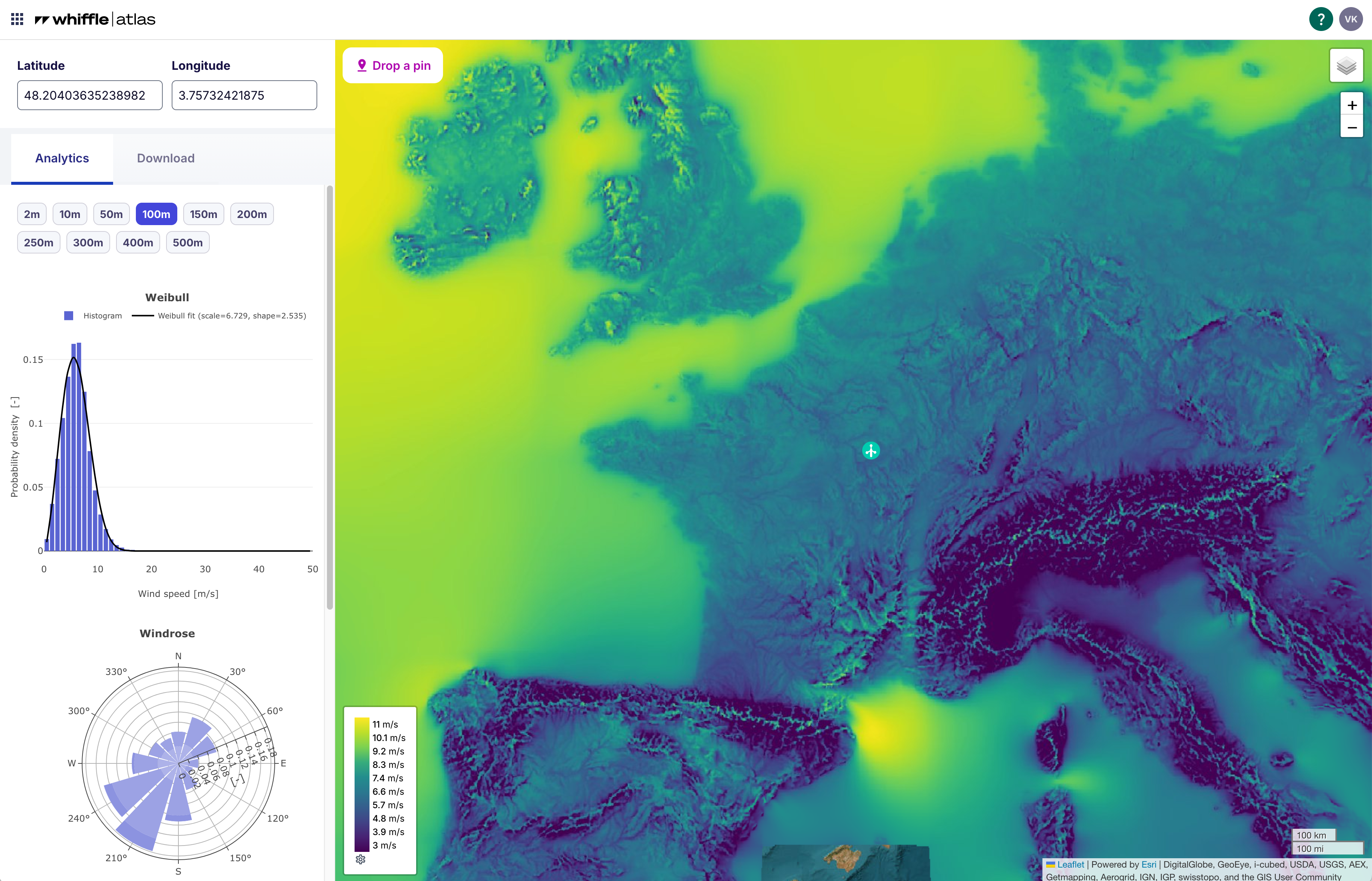
Enter a latitude and longitude (WGS 84) to select a point, or alternatively, use the “Drop a Pin” button to choose a location directly on the map.

<figure><img src="https://927730225-files.gitbook.io/~/files/v0/b/gitbook-x-prod.appspot.com/o/spaces%2FrIjVtfK7J5LmiatpVpuO%2Fuploads%2FvGlMJYzTXdzugGRpO0G1%2FAtlas%20-%20point%20selected.png?alt=media&amp;token=a61ea646-1df8-4e17-b78d-140dac4b1402" alt=""><figcaption></figcaption></figure>

Once a point has been selected, the data is fetched from the closest grid point (i.e., the nearest neighbour). Since the mesoscale data is computed on a 2 × 2 km grid, the grid point will never be more than 1.41 km away from the selected point.

On the left panel, you can instantly inspect a wind rose, Weibull distribution, and vertical profile to evaluate the 21-year wind climate. *Analytics is currently in beta for a selected audience and will be officially rolled out soon.*&#x20;

Once you’ve completed your initial assessment, navigate to the Download tab to export time series data for more detailed analysis.

### API

Atlas data is also accessible through the Whiffle API clients. Detailed instructions for setting up and using the API client can be found [here](https://docs.whiffle.cloud/getting-started/python-client).

### FAQ

**How is Whiffle Atlas different from ERA5, GWA, or other mesoscale datasets?**

Whiffle Atlas provides finer spatial resolution (2 km), is precomputed, directly downloadable at 10 heights (from 2m to 500m), and [validated against over 300 met masts globally](https://www.linkedin.com/pulse/benchmarking-numerically-modelled-data-wind-resource-sam-williams-ihlmf/).

What sets Atlas apart is its performance: across validation campaigns, it shows lower wind speed bias and higher correlation to measurements than other mesoscale datasets. That means reduced uncertainty in long-term wind estimates, especially in nearshore zones, coastal areas, and complex terrain where global models tend to underperform.

Use Atlas as an additional reference in your MCP, alongside ERA5, or as a faster alternative to traditional on-demand mesoscale simulations.

**What is the horizontal and vertical resolution?**

* Horizontal: 2 km × 2 km grid.
* Vertical: 2 m, 10 m, 50 m, 100 m, 150 m, 200 m, 250 m, 300 m, 400 m, and 500 m above ground level

**The region I'm looking at isn’t available. Can I request a region?**

Yes. Whiffle Atlas currently covers Europe, the United States, Australia, Japan, and Korea — with more regions in development. If your project site falls outside these areas, reach out to us directly via <support@whiffle.nl>. Custom regions can often be added based on demand or generated upon request.

**Can i choose a custom time period?**

No. By default Atlas delivers the time series for the last 21 whole years, which currently is 2004-2025.

**Is Atlas suitable for offshore wind projects?**

Yes, particularly for extrapolation across turbine clusters and regions with sparse measurement coverage.

**Does Whiffle Atlas include terrain or land cover effects?**

Yes. The Whiffle Meso model accounts for terrain and land–sea transitions at 2 km scale, improving representativeness compared to coarser reanalysis.


# Time series

The following overview highlights the output types and files generated during a time series simulation. All time stamps provided are in UTC.

### Turbines and virtual Metmasts

The main output of Whiffle Wind time series is a 10-minute-averaged time series at all your virtual wind turbine and metmast locations.

After the simulation has completed the Turbine and Metmast outputs can be downloaded as CSV from the application. An overview of the available variables is given in the table below.

&#x20;Custom averaging intervals and output variables are available through [Expert Services](/outputs/custom-outputs).&#x20;

<table data-header-hidden><thead><tr><th width="387"></th><th></th></tr></thead><tbody><tr><td><strong>At every Turbine location, at hub height</strong></td><td><strong>At every Metmast location, at all heights</strong></td></tr><tr><td>Induction corrected hub height horizontal wind speed [m/s]</td><td>Wind speed [m/s]</td></tr><tr><td>Induction corrected hub height vertical wind speed [m/s]</td><td>Wind direction [°]</td></tr><tr><td>Hub height wind direction [°]</td><td>Turbulence intensity [-]</td></tr><tr><td>Wind turbine power [W]</td><td>Temperature [°C]</td></tr><tr><td>Wind turbine thrust [N] </td><td>Relative humidity [-]</td></tr><tr><td>Temperature [°C]</td><td>Absolute pressure [Pa]</td></tr><tr><td>Induction corrected hub height turbulence intensity [-]</td><td>Air density [kg/m<sup>3</sup>]</td></tr><tr><td>Air density [kg/m<sup>3</sup>]</td><td>Boundary layer height [m]</td></tr><tr><td>Absolute pressure[Pa]</td><td> </td></tr><tr><td>Relative humidity [-]</td><td> </td></tr><tr><td>Bulk Richardson number over the rotor disk [-]</td><td></td></tr><tr><td>Wind speed difference over rotor disk [m/s]</td><td></td></tr><tr><td>Wind veer over the rotor disk [°]</td><td></td></tr><tr><td>Rotor-disk-averaged wind speed [m/s]</td><td></td></tr></tbody></table>

### Fields

After the simulation has completed the Fields can be downloaded as NetCDF from the application.

The Fields option provides as output a 100-meter-gridded, 10-minute-averaged time series of the entire LES domain, at up to 3 heights. This 2D time series allows the user to horizontally extrapolate datapoints across the domain in their analyses.&#x20;

An overview of the variables included is given in the table below. Fully customizable fields are available through [Expert Services](/outputs/custom-outputs).

### Wind Resource Grid

The Wind Resource Grid (WRG) is a spatial, statistical representation of the wind resource in a specified area, including Weibull and wind rose parameters. We provide WRG for interoperability of our results and their format with existing software solutions like WindPro, OpenWind and WindFarm.

The WRGs provided with Whiffle Wind Time Series are representative of the selected time-period of the simulation. This means they are not long-term corrected and it's bias is not yet corrected w\.r.t. to measurements.

{% hint style="warning" %}
Please beware that WRG’s of short time periods are not representative of a long-term wind climate even after applying a long-term correction method.
{% endhint %}

#### Should I expect any differences between the timeseries product and the WRG? <a href="#windresourcegrid-shouldiexpectanydifferencesbetweenthetimeseriesproductandthewrg" id="windresourcegrid-shouldiexpectanydifferencesbetweenthetimeseriesproductandthewrg"></a>

The WRGs itself are build from the same simulation output and therefore are just a different representation of the same windspeed and wind directions timeseries present in the fields.

{% hint style="info" %}
In case turbines are placed inside the simulation, the WRG will be influenced by the turbine interaction effects of these turbines
{% endhint %}

### Long term corrected results

Additional details coming soon.

### GeoTIFFs

For more details on GeoTIFF outputs, see:

{% content-ref url="/pages/ESpPAi1XE43vZoMpyiW0" %}
[GeoTIFFs](/outputs/geotiffs)
{% endcontent-ref %}

### Video

{% embed url="<https://vimeo.com/998156250/9015a0645c>" %}

A video of the modelled horizontal wind speeds at an elevation of 112.5 m over the LES domain is included with each simulation. To view the video, select the simulation of interest under the Simulations tab and click the Play Simulation button.

The video offers additional qualitative insight into what is occurring within the site. On the left frame, observe clouds passing site, while on the right, see a qualitative representation of wind speed at 100m, showcasing the effects of terrain, turbine wake and flow dynamics captured by Whiffle’s LES model. It represents higher wind speeds in lighter colours and lower wind speeds in darker colours. The date and time in UTC is shown on the top left.

Depending on the simulation period and location, different phenomenon can be observed such as fronts, sea breezes, land breezes, wind direction and wind speed changes, and turbine wake effects.

Advanced visualizations are available through [Expert Services](/outputs/custom-outputs).


# Statistics

The following overview highlights the output types and files generated during a Statistics simulation.

### Wind Resource Grid

The Wind Resource Grid (WRG) is a spatial, statistical representation of the wind resource in a specified area, including Weibull and Wind Rose parameters. We provide WRG for interoperability of our results and their format with existing software solutions like WindPro, OpenWind and WindFarm.

The WRGs provided with Whiffle Wind Statistics are created from a 180-day LES simulation, following Whiffle's [long-term-representative day selection method](/advanced-topics/long-term-representativeness) in pre-processing. This means they are long-term representative but not calibrated w\.r.t. to measurements.&#x20;

After the simulation has completed a zip with the WRGs can be downloaded from the application.

### Calibrated Wind Resource Grid

When measurements are attached on the Site step, a calibrated WRG for each height will be available for download. For more information on calibration, see:

{% content-ref url="/pages/WUPxEO7BNmYxEbU5YXpz" %}
[Measurements](/getting-started/adding-custom-data/calibration)
{% endcontent-ref %}

### Virtual Met Mast

When virtual met masts are included in the simulation setup, output heights can be specified at the output step. Analytics page plots, such as wind roses, will reflect data at these heights.

### Long-term-corrected results

In case you added one or more Turbines to your simulation, the turbine-level Energy Production will be calculated in the LES and [long-term corrected](/advanced-topics/long-term-representativeness) in post-processing.&#x20;

After the simulation has completed the long-term-corrected Annual Energy Production can be viewed in the Performance Table in the application, or downloaded as CSV.

### GeoTIFFs

For more details on GeoTIFF outputs, see:

{% content-ref url="/pages/ESpPAi1XE43vZoMpyiW0" %}
[GeoTIFFs](/outputs/geotiffs)
{% endcontent-ref %}


# Custom outputs

Custom simulation outputs are listed below. Request custom outputs through [Expert Services](/expert-services).

#### Custom Turbine and Metmast outputs

* Additional virtual Metmast and Turbine output variables, see the table below.
* Custom temporal resolutions.

<table data-header-hidden><thead><tr><th width="387"></th><th></th></tr></thead><tbody><tr><td><strong>At every Turbine location, at hub height</strong></td><td><strong>At every Metmast location, at all heights</strong></td></tr><tr><td>Rotor averaged wind power density [W/m<sup>2</sup>]</td><td>Gust [m/s]</td></tr><tr><td>Wind speed standard deviation [m/s]</td><td>Wind power density [W/m<sup>2</sup>]</td></tr><tr><td>Inflow angle [deg]</td><td>Bulk-Richardson number [-]</td></tr><tr><td></td><td>Monin-Obukhov length [m]</td></tr><tr><td></td><td>Global Horizontal Irradiance [W/m<sup>2</sup>]</td></tr><tr><td></td><td>Icing [-]</td></tr><tr><td></td><td>Surface temperature [°C]</td></tr><tr><td></td><td>inflow angle [°]</td></tr><tr><td></td><td>Wind shear exponent [-]</td></tr><tr><td></td><td>Wind veer [°/100m]</td></tr><tr><td></td><td>Wind speed standard deviation [m/s]</td></tr><tr><td></td><td>Turbulence kinetic energy [m<sup>2</sup>/s<sup>2</sup>]</td></tr><tr><td></td><td>Potential temperature [°C]</td></tr><tr><td></td><td>Diffuse Horizontal Irradiance [W/m<sup>2</sup>]</td></tr><tr><td></td><td>Direct Normal Irradiance [W/m<sup>2</sup>]</td></tr></tbody></table>

#### Custom fields

Fully customizable fields are available through Expert Services, including but not limited to:

* Vertical fields
* Calibration of wind speed fields
* Custom spatial resolutions
* Custom averaging intervals
* Custom variables (for the full list, see Metmast outputs above)

#### Advanced visualizations

Advanced visualizations are available through Expert Services, including but not limited to:

* Visualization of all atmospheric variables (for the full list, see Metmast outputs above).
* Custom horizontal field heights and vertical fields
* 3D visualizations, including terrain and turbines


# GeoTIFFs

Map layers give a spatial overview of the simulated area: terrain properties and wind properties averaged over the simulated period.

Every simulation produces a set of 2D map layers covering the simulated area:

* 🏞️ **Terrain layers** describe the surface properties of the site.
* 🌬️ **Wind flow layers** summarise the simulated period in one map per height.

The layers can be accessed in two ways:

* **On the map** in the application.
* **As a download**, listed as **Geospatial Data**: a zip archive with one GeoTIFF per layer, in the projection of the simulation (UTM), for use in QGIS, ArcGIS or another GIS tool.

### 🏞️ Terrain layers

One map is produced per quantity, describing the surface of the simulated area.

<table><thead><tr><th width="296.76171875">Layer</th><th width="81.6328125">Unit</th><th>What it shows</th></tr></thead><tbody><tr><td>🌳 <a href="#canopy-height">Canopy height</a></td><td>m</td><td>Height of the vegetation above the ground.</td></tr><tr><td>🧱 <a href="#mean-surface-roughness-length">Mean surface roughness length</a></td><td>m</td><td>Aerodynamic roughness of the surface, from smooth water to a built-up city.</td></tr><tr><td>⛰️ <a href="#surface-elevation">Surface elevation</a></td><td>m</td><td>Terrain height above sea level.</td></tr><tr><td>🧗 <a href="#terrain-complexity-rix">Terrain complexity (RIX)</a></td><td>%</td><td>Fraction of the surrounding terrain that is steep.</td></tr></tbody></table>

### 🌬️ Wind flow layers

One map is produced per height, describing the flow over the simulated period. The heights depend on the simulation type:

* 📈 **Time series**: the heights requested for the fields output.
* 📊 **Statistics**: the wind resource grid heights, or the calibration heights when measurements are attached.

{% hint style="info" %}

* If no heights are requested, no flow fields are simulated and no wind flow layers are produced.
* Surface elevation, canopy height and terrain complexity do not depend on the flow fields and are always produced.
* The wind shear exponent requires at least two heights. A simulation with a single output height contains no vertical profile, so this layer is not produced.
  {% endhint %}

<table><thead><tr><th width="259.109375">Layer</th><th width="78.05859375">Unit</th><th>What it shows</th></tr></thead><tbody><tr><td><a href="#mean-turbulence-intensity-at-10-m-s-and-at-15-m-s">🌀 Mean turbulence intensity at 10 m/s and at 15 m/s</a></td><td>-</td><td>Typical turbulence intensity at that wind speed.</td></tr><tr><td>💨 <a href="#mean-wind-speed">Mean wind speed</a></td><td>m/s</td><td>Wind speed averaged over the simulated period.</td></tr><tr><td>🛡️ <a href="#representative-turbulence-intensity-at-15-m-s">Representative turbulence intensity at 15 m/s</a></td><td>-</td><td>Design turbulence intensity a turbine must withstand (IEC IP90).</td></tr><tr><td>📐 <a href="#wind-shear-exponent">Wind shear exponent</a></td><td>-</td><td>Rate at which the wind speed increases with height.</td></tr></tbody></table>

### How the layers are calculated

#### 🌳 Canopy height

The height of the vegetation, taken unchanged from the canopy height model used in the simulation.

#### 🧱 Mean surface roughness length

The surface roughness length, averaged over all timesteps of the simulated period:

$$
\overline{z\_0} = \frac{1}{N} \sum\_{t=1}^{N} z\_0(t)
$$

where:

* $$z\_0(t)$$ is the roughness length at timestep $$t$$
* $$N$$ is the number of timesteps in the simulated period

It is part of the simulated flow fields, so it is only produced when the simulation has them.

The values span several orders of magnitude, from roughly 0.0001 m over open water to several metres over cities, and are therefore shown on a logarithmic scale.

#### 🌀 Mean turbulence intensity at 10 m/s and at 15 m/s

The turbulence intensity at that height, averaged over the timesteps in which the wind speed lies within ±0.5 m/s of 10 m/s, or of 15 m/s:

$$
\overline{TI} = \frac{1}{N\_B} \sum\_{t \in B} TI(t)
$$

where:

* $$TI(t)$$ is the turbulence intensity at that height at timestep $$t$$
* $$B = {, t : |U(t) - U\_b| \leq 0.5 \text{ m/s} ,}$$ is the set of timesteps inside the wind speed bin, with $$U\_b$$ either 10 m/s or 15 m/s
* $$N\_B$$ is the number of timesteps in $$B$$

Turbulence intensity varies strongly with wind speed, so an average over all timesteps would mainly reflect how windy each point is. Restricting the average to a narrow wind speed bin makes the values comparable between points. Points at which the wind speed never falls within the bin during the simulated period are left blank.

#### 💨 Mean wind speed

The wind speed at that height, averaged over all timesteps of the simulated period:

$$
\overline{U} = \frac{1}{N} \sum\_{t=1}^{N} U(t)
$$

where:

* $$U(t)$$ is the wind speed at that height at timestep $$t$$
* $$N$$ is the number of timesteps in the simulated period

#### 🛡️ Representative turbulence intensity at 15 m/s

The 90th percentile of the turbulence intensity over the same ±0.5 m/s bin around 15 m/s, as defined by the IEC (IP90). Assuming the values within the bin are normally distributed, this equals:

$$
TI\_{rep} = \overline{TI} + 1.28 , \sigma\_{TI}
$$

where:

* $$\overline{TI}$$ is the mean turbulence intensity at 15 m/s, the layer described above
* $$\sigma\_{TI}$$ is the standard deviation of $$TI(t)$$ over the same set of timesteps $$B$$

The mean describes the typical conditions at that wind speed, while the representative value describes the design turbulence a turbine at that location must withstand. Points at which the wind speed never falls within the bin during the simulated period are left blank.

#### ⛰️ Surface elevation

The terrain height above sea level, taken unchanged from the digital terrain model used in the simulation.

#### 🧗 Terrain complexity (RIX)

The Ruggedness Index is the fraction of the surrounding terrain that is steeper than a critical slope:

$$
RIX = 100% \times \frac{A\_{s > s\_c}}{A\_R}
$$

where:

* $$A\_R$$ is the terrain area within a radius $$R$$ of the point
* $$A\_{s > s\_c}$$ is the part of that area where the local slope $$s$$ exceeds the critical slope $$s\_c$$
* $$R = 3500$$ m and $$s\_c = 0.3$$, about 17°, are the WAsP defaults

The slope is taken in the steepest direction, so the index does not depend on the wind direction. It indicates where the terrain is steep enough for linearised flow models to become unreliable, and therefore where LES adds the most value.

The layer is shown in three classes rather than as a continuous range, following the WAsP rules of thumb:

* below 5 % is low
* between 5 % and 30 % is moderate
* above 30 % is high

Near the edge of the domain only the terrain inside the domain can be counted, and points whose surroundings are less than half covered are left blank.

#### 📐 Wind shear exponent

The exponent $$\alpha$$ of the power-law wind profile:

$$
U(z) = U\_{ref} \left( \frac{z}{z\_{ref}} \right)^{\alpha}
$$

where:

* $$U(z)$$ is the wind speed at height $$z$$
* $$U\_{ref}$$ is the wind speed at the reference height $$z\_{ref}$$
* $$\alpha$$ is the wind shear exponent

$$\alpha$$ is obtained as the slope of a least-squares fit of $$\ln(U)$$ against $$\ln(z)$$ over all available heights, using wind speeds that are averaged over time before the fit.

Fitting each timestep separately and averaging the exponents afterwards would give calm hours a disproportionate weight, as they carry almost no energy but can produce very large exponents.

The fit spans the full range of available heights, which is set by the heights requested for the fields output (time series) or for the wind resource grid (statistics). Exponents from simulations with different heights therefore describe different parts of the profile.


# Analytics & Performance

After your simulation has been completed, you will be able to access some analytics and performance metrics and visualizations for the met masts and turbines in your simulation domain. This enables a quick triage of the results before a deeper analysis or comparison is done. The plots are generated for each height at the met mast or at hub height at the turbine location.

{% hint style="info" %}
For windturbines the rotor-averaged-windspeed is used to generate the weibull and windrose plots. For more information, you can check the parametrization of the windturbine in the Whiffle LES.
{% endhint %}

#### Weibull plot <a href="#analytics-and-performance-weibullplot" id="analytics-and-performance-weibullplot"></a>

A visualization of the wind speed distribution with associated weibull fit and parameters

<div align="left"><figure><img src="https://927730225-files.gitbook.io/~/files/v0/b/gitbook-x-prod.appspot.com/o/spaces%2FrIjVtfK7J5LmiatpVpuO%2Fuploads%2FODqOT1P3VLjIbJi4RpV0%2Fweibull.png?alt=media&amp;token=bb16acbe-2fa9-47ad-b326-8d2cb3aab662" alt=""><figcaption></figcaption></figure></div>

#### Windrose plot <a href="#analytics-and-performance-windroseplot" id="analytics-and-performance-windroseplot"></a>

A visualization of the wind direction distribution at the particular location and height

<div align="left"><figure><img src="https://927730225-files.gitbook.io/~/files/v0/b/gitbook-x-prod.appspot.com/o/spaces%2FrIjVtfK7J5LmiatpVpuO%2Fuploads%2Fh3pLdy9fASCcs5OR3iNP%2Fwindrose.png?alt=media&amp;token=1c675b30-2720-4cd8-8a3e-97878bb5a715" alt=""><figcaption></figcaption></figure></div>

#### Profile of wind speed <a href="#analytics-and-performance-profileofwindspeed" id="analytics-and-performance-profileofwindspeed"></a>

A visualization of the evolution of wind speed with increasing height at the met mast location. This is sampled at the selected met mast heights when starting the simulation.

{% hint style="info" %}
This is not yet available for turbines
{% endhint %}

<div align="left"><figure><img src="https://927730225-files.gitbook.io/~/files/v0/b/gitbook-x-prod.appspot.com/o/spaces%2FrIjVtfK7J5LmiatpVpuO%2Fuploads%2FcdZFz37u1DVJhOz1Qfmq%2Fmetmast_vertical_profile_windspeed.png?alt=media&amp;token=f3a1a537-f4ba-4634-9fe2-9198084c5285" alt=""><figcaption></figcaption></figure></div>

#### Profile of turbulence intensity <a href="#analytics-and-performance-profileofturbulenceintensity" id="analytics-and-performance-profileofturbulenceintensity"></a>

A visualization of the evolution of turbulence intensity with increasing height at the met mast location. This is sampled at the selected met mast heights when starting the simulation.

{% hint style="info" %}
This is not yet available for turbines
{% endhint %}

<div align="left"><figure><img src="https://927730225-files.gitbook.io/~/files/v0/b/gitbook-x-prod.appspot.com/o/spaces%2FrIjVtfK7J5LmiatpVpuO%2Fuploads%2Fm4QrEywc1Zs8agW0uftW%2Fmetmast_vertical_profile_ti.png?alt=media&amp;token=3283d74d-5d23-416b-8762-8bcf2b4a5ce7" alt=""><figcaption></figcaption></figure></div>

#### Turbulence intensity vs windspeed <a href="#analytics-and-performance-turbulenceintensityvswindspeed" id="analytics-and-performance-turbulenceintensityvswindspeed"></a>

A visualization how the turbulence intensity varies with increasing windspeed. This visualization can be used to inspect any spikes on turbulence intensity for higher windspeed

{% hint style="info" %}
This is not yet available for turbines
{% endhint %}

<figure><img src="https://927730225-files.gitbook.io/~/files/v0/b/gitbook-x-prod.appspot.com/o/spaces%2FrIjVtfK7J5LmiatpVpuO%2Fuploads%2FRMLEBIldyoLo6zquqGQb%2Fmetmast_ti_vs_wind_speed.png?alt=media&amp;token=a77c99a7-ad7c-4752-941a-1a63f76ba1e5" alt=""><figcaption></figcaption></figure>

#### Windspeed timeseries <a href="#analytics-and-performance-windspeedtimeseries" id="analytics-and-performance-windspeedtimeseries"></a>

A visualization of the wind speed timeseries at this particular location and altitude

<figure><img src="https://927730225-files.gitbook.io/~/files/v0/b/gitbook-x-prod.appspot.com/o/spaces%2FrIjVtfK7J5LmiatpVpuO%2Fuploads%2FHsZhxFjDya2nzkGfWIMC%2Fturbine_windspeed_timeseries.png?alt=media&amp;token=f2ac0834-7739-4362-a24d-06d1134a32b8" alt=""><figcaption></figcaption></figure>

#### Turbulence intensity timeseries <a href="#analytics-and-performance-turbulenceintensitytimeseries" id="analytics-and-performance-turbulenceintensitytimeseries"></a>

A visualization of the turbulence intensity timeseries at this particular location and altitude

{% hint style="info" %}
This is not yet available for turbines
{% endhint %}

<figure><img src="https://927730225-files.gitbook.io/~/files/v0/b/gitbook-x-prod.appspot.com/o/spaces%2FrIjVtfK7J5LmiatpVpuO%2Fuploads%2FWks17fzO4c81YtFenh0i%2Fmetmast_timeseries_ti.png?alt=media&amp;token=119453fd-9d16-40e4-bfe4-10d60dc3b5aa" alt=""><figcaption></figcaption></figure>

#### Power output <a href="#analytics-and-performance-poweroutput" id="analytics-and-performance-poweroutput"></a>

{% hint style="info" %}
This is not yet available for metmasts
{% endhint %}

<figure><img src="https://927730225-files.gitbook.io/~/files/v0/b/gitbook-x-prod.appspot.com/o/spaces%2FrIjVtfK7J5LmiatpVpuO%2Fuploads%2FpN9VWPcYSaKtwcyDqxGt%2Fturbine_power_output_timeseries.png?alt=media&amp;token=95876ea5-9b5c-48cf-977c-6b73ca235d98" alt=""><figcaption></figcaption></figure>

## Performance <a href="#analytics-and-performance-performance" id="analytics-and-performance-performance"></a>

On the performance tab you can inspect the mean wind speed and energy production numbers of all turbines. These numbers are computed for both the simulation period as well as a long-term corrected variant in case more than 180 simulation days are selected. More information about the long-term correction can be found [here](broken://pages/yktDzgzhpl7TPOyF7cij).


# How to calculate aerodynamic losses?

Whiffle uses a physical, first-principle-based weather and wind farm simulation model, and therefore we cannot readily separate the impact of wake and blockage effects on the modelled cumulative production of the wind farm.

However, it is possible to determine total aerodynamic losses by running two simulations: a standard simulation, in which the turbines execute a thrust force on the flow, and an additional simulation using thrust-free turbines, in which the turbines impose zero drag on the wind flow. Thus, thrust-free turbines are “virtual turbines”, which produce power without affecting the wind flow.

Total aerodynamic losses are then calculated by simply subtracting the energy produced by the standard turbines from the energy produced by the thrustless turbines. This is represented by the following equation:

**Total aerodynamic losses = Power produced by thrust-free turbines - Power produced by turbines with thrust**

### Setting up simulations for total aerodynamic losses <a href="#howtocalculatetotalaerodynamiclosses-howtosplittotalaerodynamiclossesintointernalandexternallosses" id="howtocalculatetotalaerodynamiclosses-howtosplittotalaerodynamiclossesintointernalandexternallosses"></a>

{% embed url="<https://vimeo.com/1004050757/41478a40d8>" %}

Two simulations are needed, which can be executed in random order.  One simulation is with thrust and another thrust-free.

**First with thrust simulation:**

Set up a new simulation. In the Wind farm step, you can toggle the thrust for turbines on and off for each wind farm. Thrust is enabled by default for all turbines in new wind farms, so no additional action is needed.

<figure><img src="https://927730225-files.gitbook.io/~/files/v0/b/gitbook-x-prod.appspot.com/o/spaces%2FrIjVtfK7J5LmiatpVpuO%2Fuploads%2FBo0yGXS6rvotjLWN43oG%2Fwind%20farm%20-%20thrust%20on.png?alt=media&amp;token=b23ff3d5-f3fb-4762-b4cf-0d48e5d1d8b2" alt=""><figcaption></figcaption></figure>

**Second thrust-free simulation:**&#x20;

After submitting the first run, you can use it as a template for the second run by clicking the "Copy & Edit" button on the Simulation overview page.&#x20;

Ensure all turbines are set to thrust-free by turning off the thrust toggle for each wind farm.

<figure><img src="https://927730225-files.gitbook.io/~/files/v0/b/gitbook-x-prod.appspot.com/o/spaces%2FrIjVtfK7J5LmiatpVpuO%2Fuploads%2FjsWLlE7GhrWkYQajsx88%2Fwind%20farm%20-%20thrust-free.png?alt=media&amp;token=3d48bead-860f-4e9d-b252-b3d098a78261" alt=""><figcaption></figcaption></figure>

**Calculate aerodynamic losses**

We provide the Whiffle API Client to easily calculate aerodynamic losses. See our [example notebooks](https://docs.whiffle.cloud/getting-started/python-client#whiffle-client-example-notebooks) for more information.

{% content-ref url="/pages/TxuGmJ1SesEMWXjj013x" %}
[API client](/getting-started/python-client)
{% endcontent-ref %}


# Measurement Campaign Augmentation

Coming soon


# Wind Resource Assessment

Coming soon


# Turbine Interaction Effects

Coming soon


# Post Construction Assessment

Coming soon.


# The Whiffle LES model

The lowest portion of the atmosphere, called the *atmospheric boundary layer* (ABL, it stretches to about 1 km height), is defined by its strong interaction with the Earth’s surface. Through friction, heat exchange, evaporation, and terrain effects, the air flow in the ABL is turbulent: it is filled with ever-changing vortices, whirls, and eddies. These structures range in size from millimeters up to kilometers, and the particularly large ones are often marked at their tops by clouds. At night, when the sun has set and the surface cools, the turbulence in the ABL often fades and makes way for stable and calm atmospheric conditions.

{% embed url="<https://player.vimeo.com/video/894129803?amp;app_id=58479&amp;autopause=0&amp;badge=0&amp;player_id=0&h=1a85f2cb2e>" %}
*Two contrasting LES simulations of the atmospheric boundary layer. Left: convective conditions cause turbulence, and create cumulus cloud. Right: stable conditions cause a calm, stratified air flow. The colors at the bottom visualize the wind, the colors in the vertical cross-section show potential temperature.*
{% endembed %}

The details of the air flow in the ABL matter, not only for our experience of the weather, but also to great extent for renewable energy production. The strength of the turbulence, for example, sets the importance of wake effects in wind farms; and naturally, the number and size of those clouds topping the largest eddies influence the production of a solar farm. Furthermore, wind turbines themselves can influence the wind and thereby affect the power production of surrounding turbines. In order to quantitatively assess the interaction between the atmosphere and (in the case of Whiffle Wind) wind turbines, we need a detailed model of the atmosphere.

Large-eddy simulation (LES) is such a model. Its foundation was laid in the 60’s and 70’s in the scientific meteorological community, and the technique has become the designated tool to research physical processes in the ABL. In essence, LES is a computational fluid dynamics model, that simulates the flow of air on a computational grid based on the laws of physics, where the grid boxes are about 10 m to 100 m in size. With that setup, it can explicitly simulate the turbulent structures that fill the ABL. Because of the grid spacing, however, it only simulates the ‘large’ eddies that are larger than 10 m to 100 m, hence the name. They contain the bulk of the total energy contained in the entire turbulence spectrum, and the effect of all smaller eddies is accounted for in a statistical way.

Over the years, the scientific community kept improving the LES models, in terms of both computational efficiency as well as physical accuracy. The LES model that Whiffle uses has its origins in the Dutch Atmospheric Large-Eddy Simulation (DALES), which was developed by a consortium of Dutch university research groups. The main features that define Whiffle’s LES are its functioning on graphical processing units (GPUs), which makes it fast; and its coupling to weather data, which gives the LES realistic boundary conditions. We also call this setup ‘real-weather LES’.

Whiffle Wind runs the LES for a specified domain, takes boundary conditions from the ERA5 historical weather data, and can include turbines, which influence the flow. The result is a detailed simulation of the atmospheric conditions during the run time, at a resolution of 100 m, including power production values of individual turbines.


# Meso-simulation

Phenomena in the atmosphere take on a very wide range of spatial scales: from turbulence (1 mm to 1 km); to events like thunderstorms, mountain/valley winds, sea breezes, fronts (1 km to 100 km, also called the *meso*-scale); to the large scales of low/high pressure systems, jet streams, and global climate (hundreds to thousands of km). Historical ERA5 weather data resolves these largest scales very well, and the LES is tailored for the smallest scales. It is the meso-scale, the scale in between those two, that neither is very good at simulating. That is why Whiffle Wind uses a meso-scale model in between the driving weather data and the LES.

<figure><img src="https://927730225-files.gitbook.io/~/files/v0/b/gitbook-x-prod.appspot.com/o/spaces%2FrIjVtfK7J5LmiatpVpuO%2Fuploads%2FGndXs3KIWtcYYW7Q2BmP%2Fclouds_for_whiffle_wind_docs.png?alt=media&amp;token=79284700-561d-443b-8501-27c2314b92d0" alt=""><figcaption></figcaption></figure>

The meso-simulation runs at a resolution of 2 km and has a domain of 256 km by 256 km, by which it can capture the effects of land-sea transitions, and large-scale orography. This meso-simulation directly drives the LES, and gives more realistic boundary conditions than pure ERA5. Its implementation is based on the LES code, but has several modifications that allow it to run at coarser resolutions.


# Long-term representativeness

The long-term representativeness of Whiffle Wind output is different between the Statistics and Time series option provided in the setup wizard.&#x20;

The Time series product provides time series of wind and power for a user-specified period of historical consecutive days. For example: the year 2023. To convert the mean wind and mean power values from this simulation period to long-term representative numbers, Whiffle Wind uses a technique called long-term correction. This method is explained below in the section ‘[long-term correction’](#long-term-correction-in-post-processing).&#x20;

Contrastingly, the Statistics product performs LES runs for a set of days that, together, are representative of the long-term wind climate. Therefore, the statistics of the LES run (such as WRG, wind rose) are also representative of the long-term climate. The method to find a set of 365 days that best represent the long-term climate is explained below in the section ‘[representative day selection’](#representative-day-selection-in-pre-processing)

### Long term correction (in post-processing)

The wind farm power predicted by Whiffle’s LES model strongly depends on the weather conditions during the simulation. For example; simulating a particularly windy period will yield a high power, and simulating a period with lots of stable situations will show a lot of wake effects. This way of modelling, which we also call ‘real-weather LES', gives deep insight into the atmospheric dynamics that govern the turbines' power production during the particular simulation time.

However, the output of an LES simulation of one year, or even shorter, gives no information about the long-term power production of the wind park (the annual energy production, AEP). To estimate the long-term AEP from a shorter LES simulation, therefore, we developed a method called *long-term correction*.\
\
It works as follows: from a simulation conducted in Whiffle Wind, we extract the probability distributions of each turbine’s power production. We then calculate the statistical relationships between those distributions and the probability distribution of the ERA5 100 m wind speed at the same locations. This statistical relationship is called the *conditional probability distribution*.\
\
Then there is the crucial step in the long-term correction method: we assume that this conditional probability distribution is the same in the short simulation period as in the long term. In other words: we estimate the general statistical relationship between turbine power and wind from the short simulation.\
This relationship is not ‘one-to-one', in the sense that it maps one wind speed value to one power production value. Rather, it still includes all atmospheric effects of turbulence, wind direction, and stability on power production. This is because it relates one wind speed value to a distribution of power values, and the spread in this distribution is caused by the aforementioned atmospheric effects.\
Finally, we integrate the statistical relation over 10 years of ERA5 wind speed, including all its interannual variability, which then gives an estimate of the 10 year AEP.

Naturally, the method is not perfect, it gives an *estimate* of the long-term power production as it would have been predicted by a long-term LES simulation. First and foremost, the quality of the estimate depends on the period simulated with the LES. Two rules of thumb: the longer it is, the better the long-term correction method works, and: the more varied it is (in terms of atmospheric conditions and weather), the better the the method works. This means that a full year, which will include many types of weather and the seasonal cycle, is good input for the long-term correction method. Based on internal research, the mean absolute error of then is about 0.4 % of the long-term AEP. The shorter the period becomes, the larger the error. For example, if 100 days are simulated, which are all roughly in the same season, the mean absolute error is in the order of 10 % of the long-term AEP.

So, our long-term correction method corrects the LES results for interannual variability of weather. Correcting the LES with in-situ observations is also possible, but this requires a more case-specific approach. For more information, feel free to send an e-mail to Whiffle’s Consulting service at <info@whiffle.nl>.

### Representative day selection (in pre-processing)

Whiffle Wind uses a simple method to find a set of days that best represents the long-term climate. It works as follows. First, 20 years of ERA5 wind speed and wind direction data are downloaded at simulation location. The daily mean wind speed and wind direction are then binned in a two-dimensional histogram. Each day from the 20 years gets assigned a bin number, and the days are then sorted on their bin number. Finally, this sorted list of days is sampled at a constant interval, such that number of sampled days is a certain amount of days. This set of days then has a very similar wind speed and wind direction distribution as the long-term climate.

The figure below shows an example of this method applied to ERA5 data at the Cabauw meteorological mast in The Netherlands. By default we use 180 selected days. Note that this figure is for illustrative purposes only, since it is for one site only and based on hourly ERA5 data instead of 10-minute LES data.

<figure><img src="https://927730225-files.gitbook.io/~/files/v0/b/gitbook-x-prod.appspot.com/o/spaces%2FrIjVtfK7J5LmiatpVpuO%2Fuploads%2FkaZpdtSj6jpa7iFFmHGO%2Flong_term_visual.png?alt=media&amp;token=ef02bb8a-8538-4475-b74f-85a98b6f56e2" alt=""><figcaption><p>2D probability distributions of wind speed (horizontal) and wind direction (vertical) for 20 years of ERA5 (left panel) and 365 days (middle panel) and 180 days (right panel) selected with the method explained above. Based on hourly data.</p></figcaption></figure>

Finally, to the [long-term correction method (in post-processing)](#long-term-correction-in-post-processing) is applied to the mean wind speed (and power, if applicable), to provide an additional correction specifically for the mean values&#x20;


# Missing ERA5 data

In the meso domain, Whiffle utilizes ERA5 historical weather data, which is readily available for areas within the supported regions delineated by the yellow line on the map. You have the option to run a simulation from January 1, 2000, up to ten days ago. Presently, the maximum duration for a simulation run is one year.&#x20;

Should you desire to conduct a simulation *outside* the supported regions, we encourage you to submit a special request. Our team is dedicated to helping you customize our services to suit your unique requirements. Feel free to contact us, and we will diligently work to accommodate your needs effectively.

**Troubleshooting**

* Position turbines and metmasts within the delineated *Supported regions* marked by the yellow border on the map so meso domain is contained by it.

<div align="left"><figure><img src="https://927730225-files.gitbook.io/~/files/v0/b/gitbook-x-prod.appspot.com/o/spaces%2FrIjVtfK7J5LmiatpVpuO%2Fuploads%2FRuL4rASBSehyaxV37rnq%2F280264742.png?alt=media&amp;token=b9dac6b4-3a72-45b5-bd88-913c732bdd5f" alt=""><figcaption><p>Yellow border on the map indicates the Supported regions</p></figcaption></figure></div>

<div align="left"><figure><img src="https://927730225-files.gitbook.io/~/files/v0/b/gitbook-x-prod.appspot.com/o/spaces%2FrIjVtfK7J5LmiatpVpuO%2Fuploads%2Fw2m4AG3soRgUpc2FLlOB%2F297795590.png?alt=media&amp;token=fee29ca4-1906-4875-8bce-82f9cd92a31e" alt=""><figcaption><p>Meso domain should be inside the polygon designated by the yellow border</p></figcaption></figure></div>


# Maximum domain size

Our [advanced software](/under-the-hood) leverages computations on GPU to achieve results within a day in normal conditions. This implies there is a limit on the number of computations that can be run directly coupled to what GPUs can handle.

When configuring a wind simulation it is possible that, after adding the geolocated elements such as turbines and metmasts, the LES domain needed is bigger than what the GPUs can allocate. What determines the maximum domain that can be run is a combination of spatial size plus orography complexity, meaning that allowed offshore domains tend to be bigger than onshore ones.

Whiffle is always making improvements in our software solutions so we can solve bigger domains with our SaaS solution on the cloud. At the same time, we have some inhouse hardware that allows us to run bigger domains through consultancy projects.

Should your project demand a larger domain beyond our current limitations, we welcome you to submit a special request. Our team is committed to assisting you in tailoring our services to meet your specific needs. Feel free to [reach out](/support) to us, and we will work diligently to accommodate your requirements effectively.

**Troubleshooting**

* Verify that there is not one or more turbines or met mast in a wrong position.
* Move met masts and turbines closer together if your project allows it.
* Contact Whiffle to request a simulation if current configuration can not be changed.

<div align="left"><figure><img src="https://927730225-files.gitbook.io/~/files/v0/b/gitbook-x-prod.appspot.com/o/spaces%2FrIjVtfK7J5LmiatpVpuO%2Fuploads%2FdVLJrarIoKBAvbF7eZ6d%2Fturbines%20to%20far%20apart.png?alt=media&amp;token=cab097d6-a1b2-463f-bfc9-0bf62f6d1265" alt=""><figcaption><p>Two turbines (pink dots) are positioned with excessive distance between them, leading to a domain size larger than allowed</p></figcaption></figure></div>


# 2026

Stay up-to-date with the latest updates on Whiffle Wind by [subscribing](http://eepurl.com/iQb8wA) to our monthly newsletter.

## 2026-10-13

**Whiffle Wind:**&#x20;

* A new `nrel5mw` turbine model with a corrected thrust curve has been added. The previous version is deprecated and no longer appears in the turbine list. Existing simulations that use it keep their original specifications, and its details remain viewable.
* Selecting a turbine model when setting up a simulation has been improved: the selector now shows the turbine name and ID. Once a turbine is selected, a link takes you to its detail page to check the power and thrust curves.

## 2026-09-25

**Whiffle Wind (statistics & time series)**

* **Attach your own geodata:** all users can now attach custom terrain, surface and/or canopy data to their simulations.
* **High-resolution LES at 40 m:** all users can now request high-resolution LES simulations at 40 m resolution.
* **Geodata download renamed to "GeoTIFF":** downloads now include simulation outputs such as wind speed as well as geodata, so the download option is now labelled "GeoTIFF."

**Whiffle Wind (time series)**

* **Support for 200+ met masts:** timeseries simulations can now include more than 200 met masts.

**Whiffle Wind and Atlas**

* **Descriptive browser tab titles:** each browser tab now shows a title describing the current page, so it's easier to tell multiple open tabs apart.

## 2026-09-07

**Whiffle Wind**

* **Full GeoTIFF set for statistics simulations:** statistics simulations now include the complete set of GeoTIFFs. Previously you only received terrain quantities such as elevation, and now you also get wind flow quantities such as turbulence intensity.
* **New GeoTIFF outputs (statistics & time series):**
  * **Wind shear:** shows how quickly wind speed increases with height, to help you select the best turbine for a site.
  * **Representative turbulence intensity at 15 m/s:** the 90th-percentile TI, also to help you select the best turbine for a site.
  * **Terrain complexity map:** based on the RIX index, for a quick assessment of where the wind flow is likely to be laminar or turbulent.
* **GeoTIFFs grouped by category (statistics & time series):** GeoTIFFs are now organised into two groups, Terrain and Wind Flow, so you can find what you need faster.

**Whiffle Wind and Atlas**

* **New map layout:** map controls have been repositioned for a cleaner view:
  * *Top right:* boundaries legend and controls (full screen, 3D map, compass)
  * *Bottom left:* scale and attributions
  * *Bottom right:* map menu (backgrounds, overlays) and editable legend colorbars

## 2026-08-05

**Atlas**

* **Weibull plots now capped at 35 m/s** (previously 50 m/s), removing the stretch of empty space at the high end of the plot.
* **Fixed download failures in tile overlap zones**: downloads requested in the \~15 km strip where adjacent tiles overlap no longer fail.
* **Downloads no longer marked successful prematurely**, which previously could result in a download being charged to your balance before it had actually completed.
* **Clearer ERA5 timeout errors**: if an ERA5 download times out, you'll now see a descriptive error instead of the download staying stuck on "pending."

**Whiffle Wind (time series)**

* **Geotiff metadata included**: every GeoTIFF, whether viewed as a map layer or downloaded, now comes with its metadata (units, colormaps, etc.) attached.
* **New output quantities available as GeoTIFFs**: surface roughness length, mean wind speed per height, mean turbulence intensity at 15 m/s per height, and canopy heights. All can be inspected via map layers or downloaded.
* **More informative turbulence intensity GeoTIFF**: mean turbulence intensity is now generated at 10 m/s (per height) instead of across all wind speeds, since turbines mostly operate around that speed.

**Geodata upload in Whiffle Wind**

*This feature is behind a feature flag. Early access is available via Whiffle Support.*

Attaching uploaded geodata to a simulation now happens directly in the **Site** step, instead of the Via Support area. Geodata isn't yet supported for direct runs, but we've made this interface change ahead of that becoming available.

## 2026-07-22

* Customers using our Python client on machines without browser access can now log in via the **OAuth device code flow**.

## 2026-07-07

* **ERA5 data** can now be downloaded from Atlas for free, offering 26 years of representative data at 31 km resolution. Simply add a point to instantly download ERA5 data.
* Added **Elevation and Mean Turbulence Intensity overlays**, downloadable as GeoTIFF. On the simulation detail page of Whiffle Wind, overlays can be activated via the map layer button or downloaded via the Download button.
* In Whiffle Wind, you can now switch resolution from 100 meter to 40 meter and start the run directly. *This feature is behind a feature flag. Early access is available via Whiffle Support.*

## 2026-06-24

Added filters above the simulation list. You can now filter by simulations you created, time series or statistics type, and status (e.g. draft, successful, in progress).

## 2026-05-22

**Configurable wind direction sectors** Previously defaulted to 16 sectors before moving to 12, reflecting standard practice in wind resource assessment and layout analysis. Both options are now available — choose what works for your workflow.

**Broader file format support** Import met masts, wind farms, turbines, and areas of interest from a wider range of formats: KML, KMZ, GeoJSON, GeoPackage, GPX, zipped shapefile, and CSV. Upload your existing GIS data directly, without conversion steps.

## 2026-05-13

**Calibration** has left beta and is now **available to all users** 🎉. Projects with met mast or LiDAR data can integrate measurements directly into the WRG generation process, aligning the simulated wind climate with observed conditions and eliminating bias on mean wind speed.

Calibration is currently supported for Statistics simulations only. To request a calibrated Time Series, set up a simulation in Whiffle Wind and select **Run via support** on the Overview step.

{% content-ref url="/pages/WUPxEO7BNmYxEbU5YXpz" %}
[Measurements](/getting-started/adding-custom-data/calibration)
{% endcontent-ref %}

## 2026-05-07

* The Simulation Setup Outputs step now shows only sections and input fields relevant to the current data selection, reducing clutter and improving clarity.
* In the turbine model form, **Reference density** has been renamed to **Power curve air density** and **Reference Turbulence Intensity** to **Power curve turbulence intensity**, to better reflect their meaning.

## 2026-05-05

The Wind Farm and Met Mast steps have been merged into a single step called **Site**. The new Site step also lets you define an area and set up calibration with measurements.

## 2026-04-08

#### **Atlas**

📊 **Export analytics charts as PNG** You can now save any chart on the Analytics page as a PNG image by clicking the camera icon — making it easier to share results and include visuals in reports.

📅 **Representative period now visible** The representative period for your data is now shown on both the **Analytics** and **Download** tabs.

#### **Whiffle Wind**

**Fixed tooltip visibility for wind farm placement** A bug that caused the wind farm placement tooltip (explaining whether a farm is inside or outside the LES boundary) to be partially hidden behind the map has been fixed. The full guidance is now visible.

#### **Measurements in Whiffle Wind**

*This feature is behind a feature flag. Early access is available via Whiffle Support.*

**Smarter measurements uploader** Uploading measurement data is now more flexible and forgiving:

* **Sensor names with brackets** are now accepted, removing a common source of upload errors.
* **Special characters in column headers** are supported, and leading/trailing spaces are automatically trimmed so your data is cleaned on import.
* **Automatic timezone conversion** handles timestamps with UTC offsets, so you don't need to pre-process time data manually.
* **Timestamps are trimmed automatically**, preventing hidden whitespace from causing failures.
* **Clearer time format errors** — if a time format isn't recognised, you'll now get a specific error message.
* **CSV delimiter auto-detection** means both comma- and semicolon-separated files are accepted without any manual adjustment.
* **Most characters in file names** are now supported, so you rarely need to rename files before uploading.
* **More flexible timestamp column names** — in addition to "Timestamp" and "Time", the uploader now recognises variations like lowercase "time" and "timestamp".
* **Common placeholder values** such as `-99`, `9999`, `9999.99`, `-`, and empty strings are now automatically treated as missing data (NaN), preventing these from skewing your results.

**Validation for measurement heights** Atlas now checks that every measurement height includes both a wind speed and wind direction, catching incomplete configurations before they cause issues downstream.

**Status icons in Measurements and Geodata lists** Measurements and Geodata items now display a clear status icon showing whether an item is a **draft** or has been **marked as final** — so you can quickly see what's ready to use in a simulation.

## 2026-01-29

* Implemented **automatic name saving** in the Simulation Wizard. Simulation names are now saved while typing, preventing loss of draft data.
* Added **plots in the Atlas side panel** for **Weibull, wind rose, and vertical wind speed profiles**, making it easier to **inspect weather data on the fly**. *This feature is behind a feature flag and will be available shortly.*
* Added **Measurements, Geodata, and Support info** to the Simulation Detail page, allowing both users and Whiffle Support to see which data was used in a **Via Support** run.
* **Default number of wind sectors** is now **12 instead of 16** for Statistics data in Whiffle Wind.


# 2025

Stay up-to-date with the latest updates on Whiffle Wind by [subscribing](http://eepurl.com/iQb8wA) to our monthly newsletter.

## 2025-12-16

Added support for selecting **multiple Measurements and Geodata files** in the Simulation Overview setup. *This feature is behind a feature flag. Early access is available via Whiffle Support.*

## 2025-11-18

Introduced **simulation submission via handover**. You can now request a **customised LES run** through Whiffle Support, enabling you to:

* tailor simulations to project-specific constraints or objectives,
* request additional outputs not available in the standard interface,
* run higher-resolution domains for finer spatial detail,
* generate LES for locations without usable ERA5 input.

## 2025-11-12

Added **point WRG** (**Wind Resource Grid point**), which can now be downloaded together with the standard WRG.

## 2025-10-27

Added **download functionality** to Atlas. Users can now access **20-year time-series data** in **CSV and NetCDF** formats directly from the Atlas application.

## 2025-10-23

Editing of **Measurements and Geodata** is now disabled once finalized and locked for traceability.

## 2025-10-07

* Added **auto-save** to the Measurement Detail page. Measurements can now be used for **bias correction**.\
  *This feature is behind a feature flag. Early access is available via Whiffle Support.*
* Introduced **Geodata upload** behind a feature flag. Users can now upload **Digital Terrain Models (DTM), Digital Surface Models (DSM), and Canopy Height Models (CHM)** to Whiffle Wind.\
  *Contact Whiffle Support for early access.*

## 2025-09-26

It is now possible to **view the height of the simulated LES area** directly in the map legend.

## 2025-09-24

In Whiffle Wind, the **LES area** is automatically determined based on your **met mast** and **wind farm** locations (read more [here](https://docs.whiffle.cloud/release-notes/pages/gI7OQT4p6CdYKEWRO83J#id-2.-calculating-the-les-domain)). We have refined the method for determining this area. Thanks to ongoing improvements in the Whiffle LES model, we can now provide the **same accuracy with a smaller LES domain**, saving both time and cost.

## 2025-09-16

* Pricing model has been updated:
  * Lower prices for LES domain sizes under 83 km × 83 km
  * Slight price increase for simulations above that size
  * Pricing now reflects vertical resolution, especially important for mountainous terrain (read more about vertical resolution [here](https://docs.whiffle.cloud/release-notes/pages/gI7OQT4p6CdYKEWRO83J#id-2.2-vertical-les-domain))
  * [Field ouputs](/outputs/timeseries#fields) are now *free* for all Time Series simulations
* Alongside extending the simulation area, we have added a new property to the **Wind API** that allows you to **define your own simulation area**. Whiffle automatically adds a buffer zone to this area. This feature is currently available only via the Wind API.

## 2025-08-29

Introduced **Atlas API endpoints**. You can now easily access **20-year time series** data in **CSV** and **NetCDF** formats via the Atlas API.

## 2025-07-22

The Overview step in Whiffle Wind has been enhanced to provide clearer insights into the expected outputs based on your simulation setup.

## 2025-07-01

The hourly / monthly table on the Performance tab of the detail page now allows switching between Total Production and Capacity Factor, making it easier to compare performance across wind farms.

## 2025-06-24

* **Performance Tab Enhancements**\
  The Performance tab on the simulation detail page now provides an overview of the wind speed and energy production per wind farm. You can select an individual wind farm to view more detailed data, including:
  * An hourly / monthly table
  * Wind speed and energy production per turbine
* **Overview Tab Improvements**\
  The Overview tab now displays more comprehensive information about the simulation configuration:
  * A table listing **met mast** locations
  * A new table showing **wind farms**, including:
    * Turbine locations within each wind farm
    * Selected turbine model
    * Whether **thrust** was enabled or disabled
    * Domain placement (LES or MESO)
  * The heights set for WRG and Fields are now also displayed

## 2025-06-03

* Selected turbines in a simulation setup are now referenced by the turbine model's ID instead of its name. This change helps distinguish between turbine models that share the same name. In a future update, the turbine model ID will also be displayed in the simulation wizard, making it easier for users to differentiate between models with similar names.
* Enhanced error messages for cases where a full page fails to load. The messages are now more readable and include a button to easily notify Whiffle Support and request assistance.

## 2025-04-19

**Turbine Detail Page & Management Improvements**

* A turbine detail page has been added, displaying turbine specifications along with graphs for the Power and Thrust curves, making it easier to reference turbine model specifications.
* An additional tab presents a detailed table with **Reference Wind Speed**, **Power**, and **Thrust Coefficient** values.
* The process for **adding, editing, and deleting turbines** has been streamlined for a smoother and more intuitive experience.

## 2025-04-03

* **Free Simulation Message**\
  Free trial users will now see a message on the Overview step of the setup wizard, informing them that their simulation is a gift from Whiffle and will be run free of charge.
* **First-Time User Onboarding**\
  New users are now guided through a quick onboarding experience, providing helpful tips, tricks, and essential information to help them get started with Whiffle Wind more effectively.

## 2025-03-26

* Simulations can now be **cancelled** using the Cancel button on the simulation detail page.\
  Please note that a fee may apply depending on how long the simulation has been running.\
  For more details, refer to our documentation: [Cancelling a Simulation](/getting-started/cancelling-a-simulation).

## 2025-01-30

* Enhanced readability of period info details by removing the duplicate UTC label, ensuring it fits better on the detail page.
* Added a visible cursor on hover in the simulation wizard steps, signaling that steps can be navigated back to.
* Fixed an issue where importing an incorrect turbine specification blocked the upload of a new turbine spec.
* Introduced a direct URL to the registration form, simplifying the registration process from whiffle.nl and other sources.
* Revamped the downloads list for a more compact and readable layout.
* Long-term correction warnings are now only displayed for time series simulations, resolving their incorrect appearance in statistics simulations.

## 2025-01-07

* **New Period Option: Statistics (Beta)**
  * Introduced a new period option called Statistics in the period step of the simulation setup wizard.
  * This feature is currently in Beta, allowing users to test and provide feedback.
  * The Statistics option simulates a sample of days to generate 20-year statistics in the most cost-efficient manner.&#x20;
* **Simulation Video Controls**
  * Added the ability to adjust the speed of simulation videos.
  * You can now increase or decrease playback speed for a customized viewing experience.


# 2024

Stay up-to-date with the latest updates on Whiffle Wind by [subscribing](http://eepurl.com/iQb8wA) to our monthly newsletter.

## 2024-11-14

* **Link to Whiffle LES Model Release Notes:** Click the yellow badge in the version display to directly access the Whiffle LES model release notes on Whiffle Wind Docs.
* **Version Warnings for Simulations when Copying:** Receive notifications when copying simulations that were run on an older model version than the one currently in use. This ensures you are aware of potential discrepancies and can make informed decisions when managing or comparing simulations.

## 2024-11-12

* **Whiffle LES Model Version Tracking**
  * The Whiffle LES model version number is now displayed on the overview step and detail page.
  * This enhancement ensures better tracking of updates to the LES model, providing transparency and allowing users to align their simulations with the latest improvements.
  * By maintaining consistency across versions, users can confidently compare results and take advantage of model refinements that improve accuracy and representation.
* **Improved Setup Wizard Naming Step:** The name input field in the setup wizard has been enhanced for a smoother workflow:
  * The entered name is now displayed above the setup wizard steps, offering users better context as they progress.
  * The input field has been expanded to accommodate longer names or descriptions.
  * New documentation links are available on the right-hand side, providing quick access to guidance on confirming simulations.
* **Optimized Map Rendering:** Addressed performance issues with map zoom and panning, particularly when handling a large number of turbines:
  * Only turbines and met mast icons currently in view are rendered as SVGs, significantly improving responsiveness.
  * Elements outside the zoomed view are now displayed as Circle components, reducing load times and enhancing performance.
* **Turbine Model in Map Tooltips:** Tooltips on the map now include the turbine model name, providing additional context and detail at a glance.
* **Colorized Elevation Map:** The elevation map has been upgraded to use color gradients instead of grayscale, improving visual clarity and making it easier to interpret elevation data.

## 2024-10-30

* **Checkbox for Accepting Terms and Conditions Removed:** The checkbox for accepting **Terms and Conditions** on the **overview step** has been removed. This step is no longer necessary, as acceptance is already completed during the **registration process**, ensuring a more streamlined and efficient user experience.

## 2024-10-16

* **Contact Support Button:** We’ve added a contact support button that understands where you are in the platform. Whether you’re setting up a simulation or reviewing results, it allows you to ask specific questions based on your current step, connecting you directly to Whiffle Support for tailored assistance.&#x20;
* **Colour-Coded Wind Farms:** Easily differentiate between wind farms on the map with new colour coding.
* **Turbine Tooltips:** Each turbine now displays its name, location (latitude/longitude), associated wind farm, and whether the wind farm is set to with thrust or thrust-free.
* **New Overlay Maps:** You can now easily inspect the simulation input maps, ESA Worldcover and Ensemble Digital Terrain Model, as map overlays during set-up.
* **Enhanced CSV Upload Validation:** We've improved the validation process when uploading CSV files for turbines or met masts. Now, if the file contains empty cells resulting in incomplete location data, a warning message will appear. Additionally, the turbine model dropdown will no longer automatically reset to the NREL 5MW model if a different model has already been selected.

## 2024-10-03

* **Turbine Model Duplication:** Users can now duplicate turbine models directly from the turbine page. This feature allows users to quickly copy an existing turbine model, modify specifications (e.g., turbine height), and immediately use the updated model in simulation setups, streamlining the workflow.
* **Balance Page:** The Balance page provides a detailed breakdown of costs for each successful simulation and a summary of total credit purchases. A top-up button allows users to conveniently purchase additional credits. The Balance page can be accessed from the user menu in the top right corner.

## 2024-09-23

* **Visualization plots loading time:** Improved performance for visualization plot endpoints, ensuring faster load times on the Whiffle Wind analytics page
* **Update Whiffle LES Model:** Whiffle Wind has been updated to use Whiffle LES Model (ASPIRE) 13.2.1.
* **Removed the WRG 10% margin clipping:** The entire domain is now available, no longer clipping 10%.
* **Check all turbines contained in MESO domain**: Ensured turbines are always included within the MESO domain during wind simulation validation.
* **Link from Notebooks to Whiffle Wind application:** Exposed a URL to the Wind API detail page, allowing users to open Whiffle Wind web applications directly from Whiffle Client example notebooks.

## 2024-09-11

* **Drafts:** You can now view and access drafts for simulation setups. This feature allows you to leave a simulation setup mid-process and resume it later without losing progress.
* **Fix bug data not loading on Analytics page:** On the Analytics page, turbines outside the LES (Large Eddy Simulation) domain are now filtered out from the dropdown, as no data is available for these turbines. This improves clarity and ensures only relevant data is presented.
* **Update Whiffle LES Model:** Whiffle Wind has been updated to use Whiffle LES Model (ASPIRE) 13.0.0.&#x20;

## 2024-09-03

* **Self Sign-Up & SSO Integration**: We've successfully migrated to a new login system that now supports self sign-up and Single Sign-On (SSO). This change streamlines the onboarding process and enhances security, allowing users to quickly and securely access their accounts using existing credentials from supported SSO providers.
* **Removal of "Show More" Button**: The "Show More" button has been removed from the simulation listing page, allowing for a cleaner and more intuitive overview of available simulations. This update ensures that all simulations and related actions, such as Download and Copy & Edit, are immediately visible and accessible, enhancing user efficiency and experience.
* **Enhanced Loading Speed**: We've optimized the loading performance of the simulation listing page, resulting in faster access to your simulations. You can now view your simulations with minimal delay.
* **Font Rendering Issue Resolved**: A rendering issue that affected font display in Safari has been fixed. This was achieved by implementing the Next.js font package, ensuring consistent and accurate font rendering across all browsers, including Safari.
* **Draft Deletion:** The Whiffle Wind API now supports the deletion of drafts. This feature will soon be available in the Whiffle Wind web application as well.
* **Fields Variable Names:** Updated variable names in the fields data to be more descriptive, improving clarity and maintainability. The following changes were made:
  * `"M"` is now called `"induction-corrected-hub-height-horizontal-wind-speed"` with units `"m/s"`.
  * `"phi"` is now called `"hub-height-wind-direction"` with units `"degree"`.
  * `"ti"` is now called `"induction-corrected-hub-height-turbulence-intensity"` with no units.
  * `"T"` is now called `"temperature"` with units `"degree_C"`.

## 2024-08-15

* **Multi-Wind Farm Upload:** You can now include multiple wind farms, enabling more advanced simulation setups and the ability to control settings, such as thrust and turbine model, on a wind farm level.&#x20;
* **Thrust Control:** Toggle the thrust on and off for each individual wind farm. Allowing you to decide in which wind farm the turbines execute a thrust force on the flow, and in which the turbines impose zero drag on the wind flow&#x20;
* **LES Domain Inclusion:** Decide whether a wind farm should be included in the suggested LES (Large Eddy Simulation) domain or not, providing more flexibility in calculating different scenarios of aerodynamic losses.&#x20;
* **Simplified CSV Uploader:** Upload a single CSV per wind farm with columns for latitude, longitude, and name. Additionally, set a turbine model for each wind farm, making it easier to switch turbine models as needed.&#x20;
* **Met Mast Step:** The placement of met masts now has its own step in the setup wizard, ensuring a more organized and efficient setup process. This new step includes a simplified CSV uploader, allowing you to upload a CSV with latitude, longitude, and name columns by simply dragging and dropping.
* **New logo:** The application now proudly showcases its very own Whiffle | Wind logo.

## 2024-07-31

* **Increase Parallelism:** Simulations now run even faster! We've increased the parallelism from 50 to 128 parallel days, significantly enhancing computational efficiency and performance.

## 2024-07-19

* **Expose Atmospheric Boundary Layer Height:** The atmospheric boundary layer height is now exposed for met masts, providing more detailed and accessible atmospheric data.
* **MESO Domain Expansion:** The MESO domain now dynamically expands based on the LES domain size, improving the accuracy and relevance of mesoscale simulations.
* **New video output** :popcorn:**:** The left side of the video displays a map with the cloud field passing through, offering a visual representation of cloud movement. The right side of the video shows a qualitative representation of wind speed at 100m, providing insights into wind behavior at this altitude.

## 2024-07-04

* **Extend LES domain:** Whiffle Wind automatically suggests an LES domain based on your turbine and met mast positions, following Whiffle’s globally tested recipe. However, there may be cases that require manual extension of the LES domain. In the Layout step, simply click the "Extend LES Domain" button to customize the domain by drawing an additional area of interest. A new LES domain will be suggested, based on the geolocations and additional area.&#x20;
* **Automatic Zoom Adjustment:** The automatic zoom feature has been refined to activate only under specific conditions: when the first LES domain is drawn, or when a selected location is not currently in view.
* **Map Rendering Issue Fixed:** Previously, resizing the browser window caused the map to render incorrectly in subsequent steps of the setup wizard. This issue has been resolved. Now, the map is loaded per step in the setup wizard, ensuring that the LES domain, turbines, and met masts are properly centered and zoomed in at each step.
* **Update Whiffle LES Model:** Whiffle Wind has been updated to use Whiffle LES Model (ASPIRE) 12.9.0.&#x20;

## 2024-06-19

* **Import turbine specs with WTG and WTP files:** You can now upload turbine specifications using .wtg and .wtp files directly into Whiffle Wind. Simply upload the file—no more manual data entry required!

## 2024-06-11

* **Local Solar Midnight:** The Whiffle LES model performs optimally when initialized at local solar midnight. Consequently, all simulations will now default to start and end at this time. The output will be provided in UTC+0, meaning any shifts in start and end times are relative to 00:00 UTC, based on the local solar midnight. The Period step in the setup wizard has been updated to reflect this change.&#x20;
* **Domain Dimensions:** The map in the simulation setup now includes a legend displaying the dimensions of both the LES and MESO domains in kilometers.&#x20;
* **Long Term Correction Warning:** We now provide information on the accuracy of long-term correction in the Period step. Additionally, on the detail page showing the long-term corrected table, a warning is displayed regarding the accuracy when the simulation period is less than one year.&#x20;
* **Added Vertical Wind Speed:** We've updated the column headers in both the metmast and turbines outputs. The previous header 'wind-speed' has been changed to 'horizontal-wind-speed' and we've introduced a new variable called 'vertical-wind-speed'.&#x20;
* **Custom Turbine Best Practices:** A new documentation page has been created for best practices when specifying a custom turbine. The first item highlights the importance of entering correct turbulence intensity. A link to this documentation is now displayed in the Add Turbine modal for user reference.&#x20;
* **Fixed Link in "Your First Simulation" Message:** The message displayed to users when logging in for the first time, which provides information about setting up a first simulation, had an outdated link. This has been fixed.

## 2024-05-23

* **Copy and Edit:** With a simple click of the "Copy & Edit" button, you can now start a new simulation setup based on an existing one. This feature simplifies the process of generating secondary runs and greatly eases aerodynamic loss calculations in combination with the thrust toggle.
* **Whiffle Wind Python Client:** The Whiffle Client is now publicly available 🎉 and can be installed [via pip](https://pypi.org/project/whiffle-client/). The Whiffle Client comes with a [Python Notebook](https://gitlab.com/whiffle-public/whiffle-client-example) that allows you to run your LES simulations directly via our Wind API. Furthermore, the Notebook contains a post-processing module as well, which we aim to continuously expand with new use cases like calculating aerodynamic losses, performing a long-term correction and making striking visualizations. Links for both can be found on [docs.whiffle.cloud](https://docs.whiffle.cloud/getting-started/python-client).
* **Update ASPIRE:** Whiffle Wind has been updated to use ASPIRE 12.5.1. The "Midnight shift" change in ASPIRE 12.5.1 is for now turned off in Whiffle Wind while we work on implementing this feature in the simulation setup wizard.
* **Expose Domain Size and Resolution Properties:** Domain size and resolution properties in GeoJSON geometries are now exposed on the Wind API. This information will soon be visible in the application, allowing users to understand the size of the LES domain.
* **Bug Fix - Phi Values for Turbine Timeseries Output:** A bug where phi values for turbine timeseries output were not properly computed has been fixed. Relevant customers have been informed, and data has been corrected.
* **Fixed Alignment of Met Mast Heights:** Corrected the alignment of met mast heights in the simulation detail space by adjusting the left-side spacing.

## 2024-05-14

* **Thrust checkbox:** Users now have the convenience of seamlessly switching between a thrust-free simulation or one with thrust enabled with just a single click in the outputs step of the simulation setup. This feature simplifies the process of generating secondary runs specifically tailored for aerodynamic loss calculations.
* **Whiffle Wind Python Client:** The Whiffle Wind Python Client has undergone final optimizations and is almost ready for public release. Additionally, accompanying Jupyter notebooks have been prepared to aid users in tasks such as aerodynamic loss computations.
* **Maintaining form data on refresh:** Saved data now persists even when refreshing the simulation setup or navigating away and using the back button. Our next endeavor involves enabling users to seamlessly resume their work with draft setups.
* **Improved warning messages**: Enhanced messaging within Whiffle Wind ensures users receive pertinent feedback regarding critical issues, such as missing ERA5 data and domain sizes exceeding simulation limits.
* **LES domain loading indicator:** During location additions in the layout step, a loading indicator now accompanies the automatic calculation of suggested LES domains. This provides users with real-time feedback on the process.
* **Migration to Whiffle Wind API:** The integration of the application frontend with the new Whiffle Wind API has been completed. While not immediately perceptible to users, this integration sets the stage for future enhancements.&#x20;
* **Met mast heights:** An issue resulting in distorted application layouts due to numerous met mast heights has been resolved across the overview step, simulation listing overview, and analytics pages.
* **Team members simulations:** A bug prohibiting users from accessing fellow team members' analytics has been rectified.
* **API speed improvements:** We have implemented the persistence of the estimated number of cells for each simulation in the database. This allows for pricing calculations based on the total number of cells. Moreover, it optimizes API performance by eliminating the need for repetitive elevation requests for domains, which previously slowed down processing.
* **Naming of turbines:** Implemented a safeguard to prevent the renaming of turbine specifications with an existing name. This resolves the issue where a turbine specification could inadvertently be renamed to match an existing one, resulting in a duplicate name.
* **Resolved met mast naming issue:** Corrected a bug that caused visualizations on the analytics page to malfunction when met mast names contained underscores.

## 2024-03-19

* **Domain size:** We've expanded the maximum supported domain size to 90km x 90km, providing users with more room to maneuver and work on their projects.
* **API notebook:** We've developed a Jupyter notebook demonstrating how to use the Whiffle Wind Python client for submitting simulations and calculating aerodynamic losses.&#x20;
* **Documentation:** We've added a link to [Whiffle Wind Docs](https://docs.whiffle.cloud/) in the toolbar of Whiffle Wind, making it easier for users to access our documentation.&#x20;
* **Account creation:** We've simplified the process of creating trial accounts, making it easier for the sales team to assist users in getting started with Whiffle Wind

## 2024-03-07

* **Increased WRG heights support:** We've expanded the number of supported WRG (Wind Resource Grid) heights from 3 to 6 in the output step, providing more comprehensive data for your analysis.
* **Extended simulation period:** You can now select a simulation period from 1st January 2010 to -10 days, up from the previous limit of -100 days.
* **Timeseries plot improvements:** We've improved the clarity of time series plots by adding titles to the X axis and resolving overlapping labels on the Y axis.&#x20;
* **Maximum allowed LES domain:** Our team has adjusted the maximum allowed LES (Large Eddy Simulation) domain by fine-tuning GPU memory usage calculations, resulting in more accurate predictions and efficient resource utilization.
* **Workflow efficiency boost:** We've bolstered the stability and resource efficiency of our workflow system by optimizing server connections and implementing automatic retries for failed workflow steps, ensuring smoother operations.
* **ASPIRE Image Update:** Our latest ASPIRE image update (version 10.13.2) includes critical fixes and corrections, particularly addressing WRG sectors, to enhance overall performance and reliability.
* **Canopy:** Canopy is now enabled for all Whiffle Wind users.
* **CSV column clarity:** We've improved user clarity by renaming the column for time in CSV files to "time\[UTC]," providing better context and understanding of the data.

## 2024-02-07

* **User Information for each simulation:** In our latest release, we introduced team accounts, enabling users to view runs from their colleagues. Now, users can also identify which colleague initiated a specific simulation. On both the simulation overview page and the detail page, we display the user's name in the top right corner.
* **Simulation card redesign:** We have made slight enhancements to the simulation card on the simulation listing page. The text is now more legible, and the progress bar is more prominent. Additionally, we now display the start date and time when the simulation was submitted.
* **Expandable simulation card:** The simulation card on the simulation listing page can now be expanded by clicking "Show More". This feature allows users to quickly access additional information about the simulation, such as the simulation period, turbines and met mast used, and the location where the simulation was run.
* **Increased margin on LES domain**: We've expanded the margin around the turbines relative to their positions, as per the R\&D guidelines (doubling the LES domain's windfarm area). This adjustment reduces rough data at the edges originating from the MESO domain and enhances the quality of simulation video output.
* **Optimized zipping:** Optimized zipping speed during preprocessing tasks, leading to slightly reduced simulation completion times.

## 2024-01-17

* **Team accounts:** Users within the same team can now view runs from each other, fostering collaboration and facilitating access to simulations, even when team members are away on holiday. In the upcoming weeks, you’ll also be able to see which user has executed a specific simulation, within the application.
* **Maximum one-year simulation:** A maximum one-year simulation duration is now enforced to prevent accidental submission of extensive simulations that could consume excessive resources. An informative message is displayed in Whiffle Wind for simulations exceeding one year.
* **Contact button:** A contact email button, complete with an email template, has been added to the header. This enhancement simplifies the process for users to reach out to Whiffle Support effortlessly.
* **Meso domain displayed on map:** The map in the simulation setup now includes the meso domain.
* **Domain Size GPU Limit:** GPU memory consumption now limits domain size based on a relationship provided by Whiffle’s R\&D team. This update eliminates GPU out-of-memory errors, allowing domains up to 70.4km x 64km offshore.
* **Fixed dates bug:** Corrected date display issues on the simulation list page and standardized the presentation of simulation periods throughout the application.
* **Aspire update:** Upgraded aspire image to version 10.7.0, addressing the last numeric instability errors encountered.

## 2024-01-11

* **Output Heights Enhancement:** In the Outputs step of the simulation setup, you can now easily set specific heights for WRG and fields, alongside met mast heights. This enhancement streamlines the process of specifying required heights in the output data. To enhance stability and resource efficiency, we've introduced a limit of 3 heights for WRG and field measurements.
* **Fixed day count:** An issue with the day count on the simulation setup Period step has been identified and corrected.
* Update aspire to 10.5.1


# 2023

## 2023-12-20

* **Transitioned to the NWP Era5 archive:** After a temporary return to an older Era5 archive last week, we're pleased to announce that we have now switched back to the new NWP Era5 data service. This update ensures comprehensive data coverage within supported regions, allowing simulations to run seamlessly from 2010-01-02 to 100 days in the past.&#x20;
* **Supported regions updated:** On the map, we highlight supported regions with yellow borders. What was once a cluster of squares is now elegantly displayed with simple outlines. More importantly, the lines represent the new NWP Era5 archive instead of the old archive.
* **Reference number on detail page:** To enhance user assistance, we've added the reference number to the detail page. This improvement aims to streamline support for user inquiries regarding their simulations.
* **AEP improvements:** Enhanced the Annual Energy Production (AEP) calculations. The AEP now utilizes 10 years of historical data instead of 20, and calculations are extended to met masts, though not yet displayed on the performance page.
* **Fixed day count:** An issue with the day count on the detail page has been addressed and corrected, ensuring accurate reporting.
* Update aspire to 10.4.0
* Exposed tree\_canopy\_height parameter on AspForge API.

## 2023-12-14

* **Switched back to previous Era5 archive:** Due to the necessity of reverting the Era5 archive to an older version, the maximum end period has been revised to 2023-08-31 and some other regressions may occur. We anticipate resolving this issue by next week when we transition back to the new NWP archive.
* **Elevation map:** Explore the newly introduced elevation map on the simulation detail page. Customize the minimum and maximum height settings using the legend options for a more detailed view. (Ensemble Digital Terrain Model). Presently, the loading time for this map is relatively slow. We aim to enhance its performance gradually over time.
* **Performance map color scale customization:** Customize the turbine performance color scale by adjusting the minimum and maximum values using the map legend settings.
* **Fix non-squared issues with the video:** Submitting a rectangular domain caused the video generation to crash and is now fixed.
* **Update turbines schema limits on API:** You can now no longer submit a Turbine with a height of 10km and other limits have been refined.
* Update Aspire version (10.1.2)

## 2023-11-22

* **Extended met mast output:** Density and pressure have been added to the met mast timeseries CSV output file.&#x20;
* **Improved ERA5  data coverage:** Thanks to the amazing work of our team we now have a more complete data coverage via the NWP data-service. We are downloading the latest data as we speak and soon clients will be able to run from 2010-01-02 till 100 days in the past.
* **Time-series graphs:** The analytics page has been enriched with timeseries plots for wind speed, turbulence intensity (met mast) and power output (turbines).
* **Simulation video:** Get your popcorn ready! After running a simulation, you can now watch the visualization video on the detail page.
* **Annual Energy Production:** Long-term corrected data and AEP can now be found via the performance tab.
* **Download options:** The user now has the option to download a zip with WGR and Timeseries CSV or Fields separately.
* **Metmast heights in meters:** A small, but important detail, we now inform the user that met mast heights is set in meters.
* **Improved design:** The header and simulation setup have an updated design, making the application more cohesive.
* **Min and max date:** The date inputs on the Period step now have a min and max date. This allows the date picker to visually show that dates before 2010-01-02 and after 100 days in the past are not selectable. How this is visualized depends on your browser, Google Chrome does this well.

## 2023-11-07

* **Graphs on analytics page:** The analytics got more graphs, such as vertical profile of windspeed and TI over the turbine, allowing the user to gain insights into the simulation results.
* **Land use map:** On the simulation detail page you can now view a land use map by selecting ESA World Cover
* **Performance table total:** We added a total row to the performance table on simulation detail page.
* **Simplified confirmation:** Re-direct the user directly to homepage after setting up a simulation. On the homepage we provide a banner informing the user the simulation has started processing.
* **Visualization of turbine energy production:** Performance page now shows energy production distribution over the windfarm, with a color gradient.
* **Fixed bugs:**
  * Incorrect error message for available data has been fixed.
  * Improved responsiveness for the Geolocation form in the setup wizard.
  * Improved error messaging for missing data.

## 2023-10-10

* **Simulation overview page:** You can now view simulation details, such as turbine and metmast location, after setting up a simulation run.
* **Simulation analytics page:** Analyze the performance of turbine and metmast elements with a Windrose and Weibull graph.
* **Simulation performance page:** View the Mean windspeed and Power output per turbine.
* **Bug Fixes:** We've addressed various bugs in the setup wizard and download results functionality


# Whiffle LES model

Below are the release notes for the Whiffle LES model. Curious about how the Whiffle LES model works? [Learn more here](/advanced-topics/the-whiffle-les-model).

## v17

* Introduced a new default global canopy height dataset with tree cover at 1 m resolution, derived from satellite imagery, ALS, and GEDI observations (Tolan et al., 2024), improving land-surface representation.
* Fixed multiple preprocessing and physics issues, including terrain artifacts in obstacle preprocessing, turbine thrust curve generation and implemented interpolation for radiation module coarse graining functionality. Model parameters have been recalibrated to ensure wake losses remain consistent with previous versions, including for meso-scale simulations.

## v15

* Wind speed standard deviation, turbulence intensity and turbulence kinetic energy diagnostics now include their respective subgrid contributions.&#x20;
* Implementation of new planetary boundary layer (PBL) scheme for meso-scale simulations, improving the parameterization of boundary layer turbulence. This primarily improves the representation of the boundary layer during daytime in the meso-scale model, and by extension in the LES.&#x20;
* The surface characteristics (roughness length, etc.) within a meso-scale or LES grid box are now weighed by their respective fractional coverage within the grid box instead of taking the most common value.

## v14

* Resolved issue with retrieving terrain data in Alaska.
* Fixed sign convention in veer variable of turbine output.
* Fixed issue with initialisation of soil moisture/temperature that led to issues with the development of the day-time boundary layers, in some cases with strong spatial soil moisture gradients with values around the wilting point.

## v13

* Upgrade default subgrid configuration based on extensive verification and validation to reduce numerical artifacts and improve TI representation.
* Full implementation of AspTurbines library on GPU, leading to significant speed-up of runs with many turbines.
* Reduced wind turbine actuator disk filter width for more realistic wind turbine and wind farm representation.